

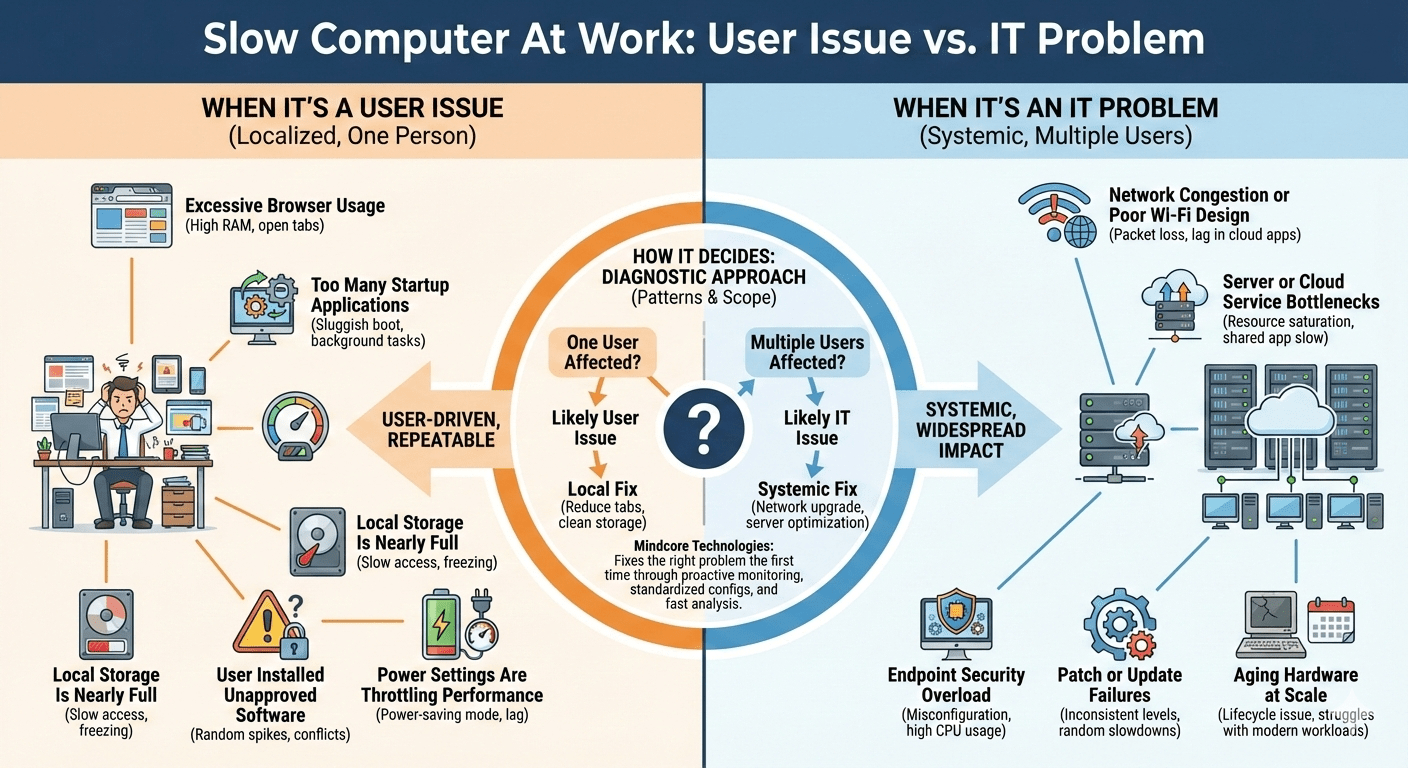
When an employee says, “My computer is slow,” the instinct is to blame IT or assume the device is outdated. In reality, workplace performance issues fall into two very different categories: user-driven problems and infrastructure or IT-managed failures.
At Mindcore Technologies, we triage slow-computer complaints daily. About half are caused by user behavior or local configuration issues. The other half point to deeper IT problems that affect multiple users and require systemic fixes. Knowing the difference saves time, reduces frustration, and prevents unnecessary hardware replacements.
This guide breaks down how IT professionals determine where the problem actually lives.
When a Slow Computer Is a User Issue
User-driven performance issues usually affect one person, not an entire department. They’re localized, repeatable, and often easy to resolve once identified.
1. Excessive Browser Usage
Browsers are the number one performance drain in modern offices.
Common issues:
- Dozens of open tabs
- Memory-heavy web apps
- Poorly written extensions
- Multiple browser profiles running at once
IT diagnosis: High RAM usage tied to browser processes
Fix: Reduce tabs, remove extensions, reset the browser profile
2. Too Many Startup Applications
Many applications quietly add themselves to startup.
Symptoms:
- Long login times
- Sluggish performance immediately after boot
IT diagnosis: Startup task overload on a single machine
Fix: Disable non-essential startup apps
3. Local Storage Is Nearly Full
When disks approach capacity, performance drops sharply.
Symptoms:
- Slow file access
- Freezing during saves
- Delayed application launches
IT diagnosis: Disk usage consistently above 85 percent
Fix: Clean up files, archive data, expand storage if needed
4. User Installed Unapproved Software
Unauthorized apps often run background services.
Symptoms:
- Random CPU spikes
- Conflicts with security tools
- Unexpected pop-ups or ads
IT diagnosis: Unrecognized processes or software
Fix: Remove unapproved applications, enforce software policies
5. Power Settings Are Throttling Performance
Laptops frequently stay in power-saving mode.
Symptoms:
- Slow multitasking
- Lag even when plugged in
IT diagnosis: CPU throttling from power profiles
Fix: Adjust to balanced or performance mode
When a Slow Computer Is an IT Problem
IT-level performance issues usually impact multiple users, departments, or locations. These are systemic problems that no amount of local tweaking will fix.
6. Network Congestion or Poor Wi-Fi Design
If cloud apps lag for many users, the issue isn’t their computers.
Symptoms:
- Slow file uploads
- Choppy video calls
- Delays in web-based tools
IT diagnosis: Packet loss, congestion, weak signal coverage
Fix: Network redesign, access point upgrades, bandwidth planning
7. Server or Cloud Service Bottlenecks
Central systems under strain slow everyone down.
Symptoms:
- Shared apps running slowly
- Login delays
- Timeouts in core platforms
IT diagnosis: Resource saturation on servers or cloud tenants
Fix: Capacity upgrades, optimization, load balancing
8. Endpoint Security Overload
Security tools misconfigured can degrade performance.
Symptoms:
- Constant disk activity
- High CPU usage across many machines
IT diagnosis: EDR or antivirus misconfiguration
Fix: Tune policies, exclude trusted processes, optimize scans
9. Patch or Update Failures
Outdated or partially updated systems behave unpredictably.
Symptoms:
- Random slowdowns
- Application crashes
- Driver conflicts
IT diagnosis: Inconsistent patch levels across systems
Fix: Centralized patch management and validation
10. Aging Hardware at Scale
When many systems struggle similarly, it’s a lifecycle issue.
Symptoms:
- Systems can’t handle modern workloads
- Memory and storage limits hit frequently
IT diagnosis: Hardware below current workload requirements
Fix: Strategic refresh planning, SSD and RAM upgrades
How IT Teams Decide Where the Problem Lives
IT professionals look for patterns:
- One user affected? Likely a user issue
- Multiple users affected? Likely an IT issue
- Only cloud apps slow? Network or platform problem
- Local apps slow too? Device-level issue
- Security alerts present? Potential malware or misconfiguration
This diagnostic approach prevents guesswork and finger-pointing.
Why Misdiagnosis Costs Businesses Money
When user issues are treated as IT failures:
- Hardware is replaced unnecessarily
- IT time is wasted
- Root causes persist
When IT issues are blamed on users:
- Productivity drops across teams
- Frustration builds
- Real risks go unresolved
Correct classification matters.
How Mindcore Technologies Keeps Work Systems Performing
Mindcore helps organizations eliminate both user and IT performance problems through:
- Proactive endpoint monitoring
- Network performance management
- Patch and update automation
- Endpoint security tuning
- Hardware lifecycle planning
- Standardized configurations
- Fast root-cause analysis
We fix the right problem the first time.
Final Takeaway
A slow computer at work is not always an IT failure and not always a user mistake. The difference lies in scope, pattern, and impact.
