

IVR, Interactive Voice Response, is an automated phone system that answers incoming calls and routes them based on user input.
It replaces manual call handling with structured call flows, allowing businesses to direct callers efficiently without requiring a live receptionist for every interaction.
At Mindcore Technologies, we evaluate IVR as part of a broader communication architecture. When implemented properly, IVR reduces call congestion, improves customer experience, and increases operational efficiency. When poorly designed, it frustrates callers and damages brand perception.
What Is IVR?
IVR is a call-routing system that interacts with callers using recorded prompts and menu options.
Instead of speaking to a human immediately, callers hear automated instructions such as:
“Press 1 for Sales, Press 2 for Support.”
Modern IVR systems can also use:
- DTMF Input (Keypad Selection)
Callers press numbers on their phone to navigate options. This is the most common and reliable method. - Voice Recognition
Advanced IVR systems allow callers to speak responses instead of pressing keys, using speech recognition technology.
IVR systems are typically integrated into VoIP or cloud-based phone systems.
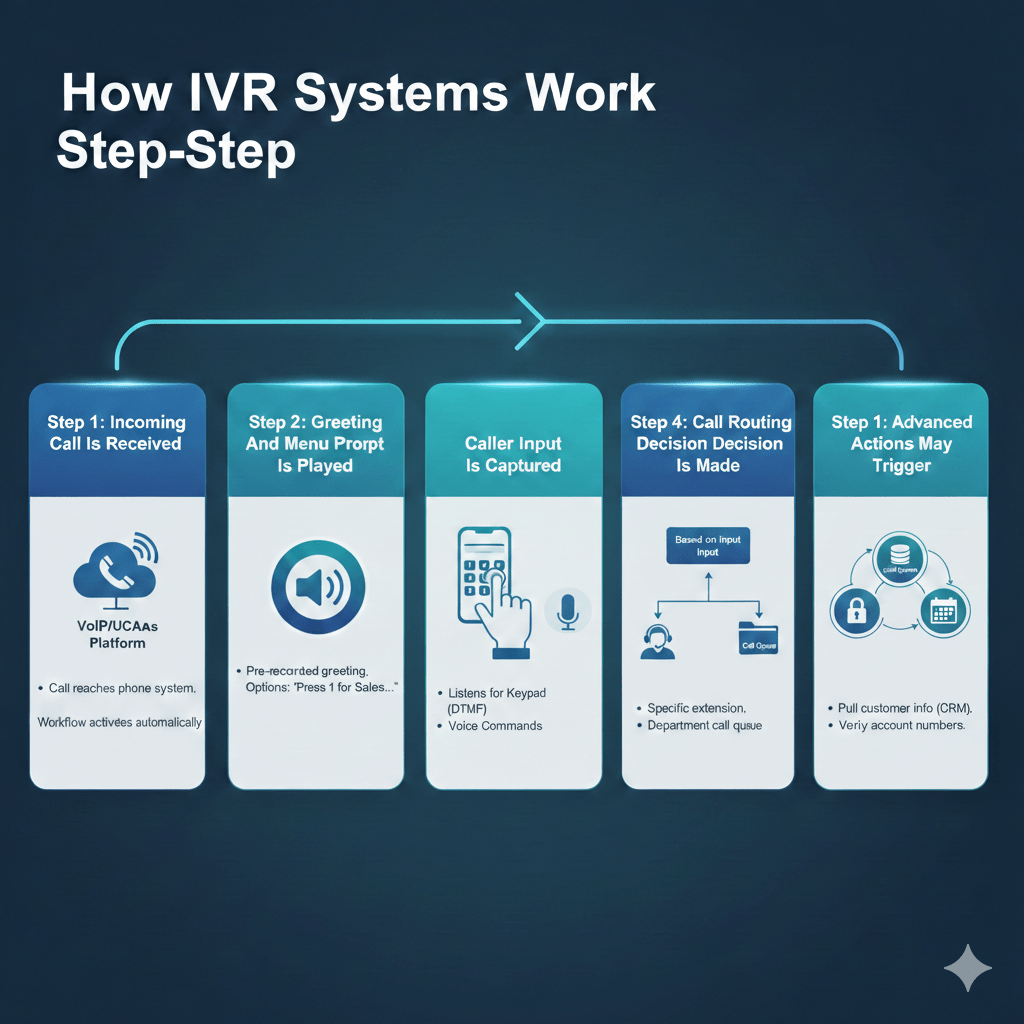
How IVR Systems Work Step-by-Step
Understanding the flow helps businesses design better experiences.
Step 1: Incoming Call Is Received
- The call reaches the company’s phone system, usually through a VoIP or UCaaS platform.
- The system identifies the called number and applies predefined routing rules.
- Instead of ringing a desk phone, the IVR workflow activates automatically.
Step 2: Greeting And Menu Prompt Is Played
- A pre-recorded or text-to-speech greeting is played to the caller.
- The system provides options such as department selection or language preference.
- Menu design determines how quickly callers reach the correct destination.
Clear menu structure reduces call handling time.
Step 3: Caller Input Is Captured
- The system listens for keypad input (DTMF tones) or voice commands.
- Input is processed in real time.
- The system validates the selection against configured routing rules.
If no input is detected, timeout rules may redirect the caller.
Step 4: Call Routing Decision Is Made
Based on the caller’s selection, the IVR system routes the call to:
- A specific extension or user.
- A department call queue.
- A voicemail box.
- Another sub-menu for additional options.
Routing logic can be time-based or availability-based.
Step 5: Advanced Actions May Trigger
Modern IVR systems can:
- Pull customer information from CRM systems using caller ID.
- Verify account numbers or PINs before connecting to an agent.
- Trigger automated responses, such as appointment confirmations.
- Route calls based on business hours.
Integration improves efficiency and personalization.
What Are IVR Systems Used For In Business?
IVR systems serve multiple operational purposes.
Call Routing And Load Distribution
- Directs calls to the correct department immediately.
- Reduces receptionist workload.
- Shortens hold times by filtering misdirected calls.
Proper routing increases productivity.
Customer Self-Service
- Allows callers to check account status or appointment details without speaking to staff.
- Reduces repetitive support inquiries.
- Operates 24/7 without staffing costs.
Self-service reduces operational strain.
After-Hours Call Handling
- Plays custom messages outside business hours.
- Routes urgent calls to on-call staff.
- Collects voicemail information for follow-up.
This maintains professional communication at all times.
Compliance And Identity Verification
- Collects PIN or account numbers before routing to agents.
- Reduces risk of unauthorized access to sensitive information.
- Supports regulated industries requiring identity checks.
Structured verification improves data protection.
Benefits Of IVR Systems
When implemented properly, IVR provides measurable benefits.
- Improved Call Efficiency
Calls are routed accurately, reducing transfers and wait times. - Reduced Staffing Pressure
Routine routing tasks are automated. - Professional Brand Presentation
Structured greetings create consistency. - Scalability During High Volume Periods
IVR absorbs traffic spikes before human agents engage. - Data And Analytics Visibility
Businesses can track menu selections and call patterns.
Automation must be balanced with usability.
Common IVR Mistakes That Frustrate Callers
Poorly designed IVR systems damage customer experience.
Common problems include:
- Too Many Menu Layers
Callers get lost navigating complex options. - Long, Unclear Prompts
Overly verbose instructions increase frustration. - No Option To Reach A Human
Customers feel trapped in automation loops. - Poor Audio Quality
Low-quality recordings reduce professionalism. - Misconfigured Routing Rules
Calls land in incorrect departments.
IVR design should prioritize clarity and speed.
Security Considerations For IVR Systems
IVR systems connect to core communication infrastructure and must be secured properly.
Businesses should ensure:
- Administrative Access Is Protected
Strong authentication prevents unauthorized configuration changes. - Call Data Is Logged And Monitored
Helps detect fraud or abnormal usage patterns. - Encryption Is Enabled For VoIP Traffic
Protects call setup and audio streams. - API Integrations Are Secured
CRM or database connections must follow access control best practices.
Security applies to automation as much as to live agents.
How Mindcore Technologies Designs Secure And Efficient IVR Systems
Mindcore supports IVR deployment by:
- Designing structured call flows that reduce caller frustration.
- Integrating IVR with CRM systems for intelligent routing.
- Securing administrative access and system configurations.
- Implementing monitoring and analytics for performance improvement.
- Ensuring underlying VoIP infrastructure is hardened and segmented.
IVR is not just an audio menu. It is part of your communication architecture.
Final Takeaway
IVR, Interactive Voice Response, is an automated call-routing system that interacts with callers and directs them to the appropriate destination using keypad or voice input.
When designed well, it improves efficiency, scalability, and professionalism. When poorly designed, it frustrates customers and creates operational bottlenecks.
IVR works best when integrated securely into a properly configured VoIP or UCaaS environment and aligned with clear business workflows.
