

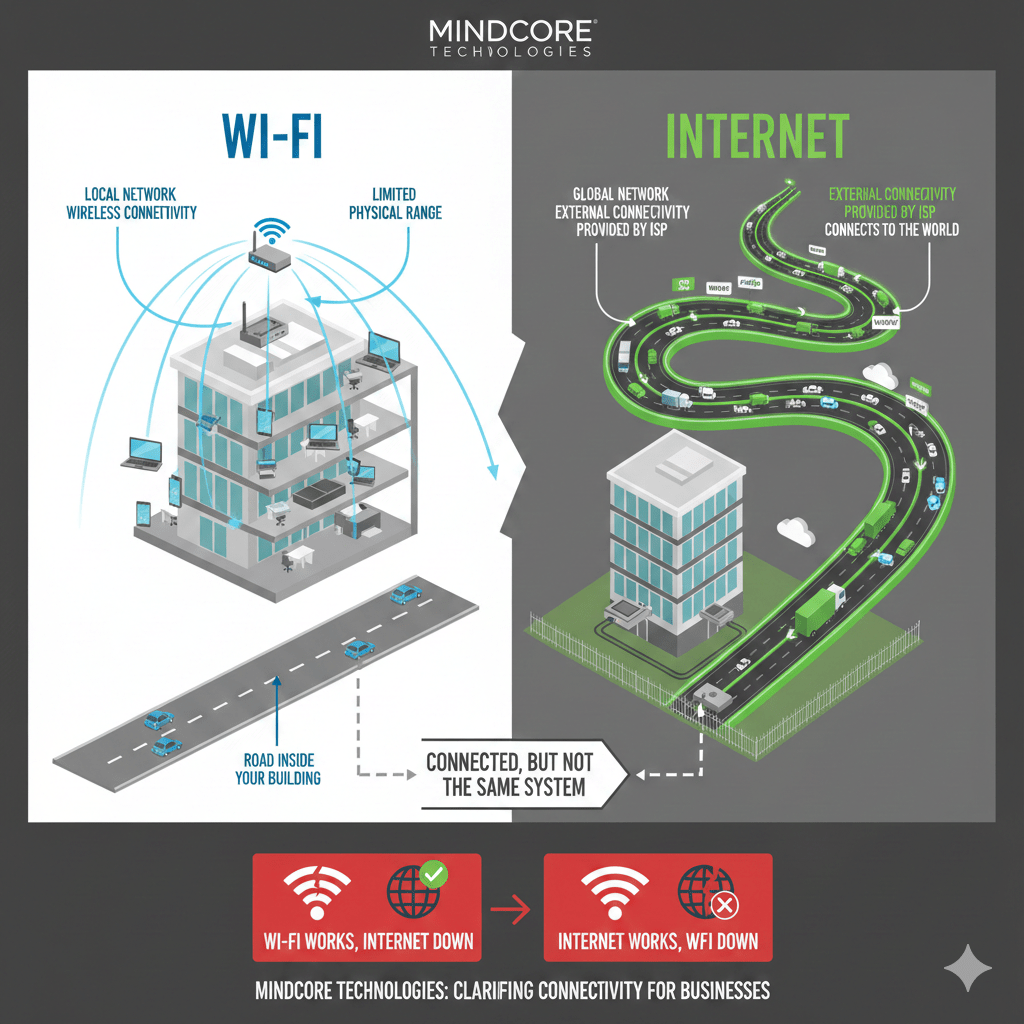
Many users confuse Wi-Fi and internet, but understanding What Is The Difference Between Wi Fi And Internet clarifies that Wi-Fi connects devices locally while the internet connects your network to the global web. That misunderstanding causes real problems, especially when businesses troubleshoot outages, performance issues, or security incidents.
At Mindcore Technologies, one of the first clarifications we make during incidents is simple: your Wi-Fi can be working perfectly while your internet is down, and your internet can be working while your Wi-Fi is failing. Knowing the difference matters.
This article breaks down the distinction clearly, explains why it matters for businesses and remote workers, and shows where security and reliability issues usually originate.
The Short Answer
- Wi-Fi is how your devices connect locally to a network.
- The internet is the global network your local network connects out to.
Wi-Fi is the road inside your building.
The internet is the highway outside.
They are connected, but they are not the same system. To answer What Is The Difference Between Wi Fi And Internet, Wi-Fi is the local connection that links devices within your office or home network, whereas the internet is the global system your local network reaches for web services and cloud applications.
What Wi-Fi Actually Is
Understanding What Is The Difference Between Wi Fi And Internet means knowing that Wi-Fi is the wireless technology connecting laptops, phones, printers, and tablets to a local network, independent of internet access.
Wi-Fi:
- Exists only within a limited physical range
- Is provided by routers or access points
- Connects devices to a local network, not directly to the internet
- Can work even if the internet is down
If devices can talk to each other locally, Wi-Fi is working.
What the Internet Actually Is
Answering What Is The Difference Between Wi Fi And Internet involves recognizing that the internet is a global network operated by ISPs, which your Wi-Fi network reaches to access websites, cloud platforms, and online resources.
The internet:
- Lives outside your building
- Is provided by an ISP
- Connects your local network to websites, cloud apps, and services
- Can be available even if Wi-Fi is broken
If your modem or ISP connection fails, the internet is down, even if Wi-Fi still shows “connected.”
Why People Get Confused
Most users experience Wi-Fi and internet together, so failures feel identical.
Common complaints like:
- “The Wi-Fi is down”
- “The internet is slow”
Often mean one is failing while the other is fine.
This confusion delays fixes and hides root causes.
Key Differences That Matter
Wi-Fi Problems Look Like
- Devices disconnecting from the network
- Weak signal or dead zones
- Some rooms working, others not
- Printers or local servers unreachable
Wi-Fi issues are usually local infrastructure problems.
Internet Problems Look Like
- No access to websites or cloud apps
- All devices affected at once
- Wi-Fi still shows “connected”
- Local systems still accessible
Internet issues are usually ISP or modem-related.
Why This Difference Matters for Businesses
Understanding the difference helps businesses:
- Troubleshoot outages faster
- Avoid blaming the wrong system
- Apply the correct security controls
- Design more reliable networks
Misdiagnosis leads to wasted time and recurring issues.
Security Implications Most People Miss
Wi-Fi and internet security are different layers.
Wi-Fi Security Protects
- Who can join your local network
- What devices can communicate internally
- Whether attackers can gain a foothold
Weak Wi-Fi allows attackers inside before they touch the internet.
Internet Security Protects
- Traffic going out and coming in
- External threats and malicious destinations
- Exposure to the public internet
Strong firewalls do not help if attackers already joined your Wi-Fi.
How Attacks Commonly Happen
Many breaches follow this pattern:
- Weak or shared Wi-Fi access
- Attacker joins the local network
- Internal systems are trusted by default
- Internet-facing controls are bypassed
This is why Wi-Fi security is just as important as internet security.
Home vs Business: Where the Difference Matters Most
At Home
- Wi-Fi issues usually cause frustration
- Internet issues cause outages
- Security risks still affect work accounts
Home Wi-Fi often becomes a backdoor to business systems.
At Work
- Wi-Fi issues disrupt productivity internally
- Internet issues stop external operations
- Both affect uptime, security, and trust
Businesses must manage both intentionally.
How Businesses Should Manage Wi-Fi and Internet Separately
Strong environments treat them as distinct layers:
- Business-grade Wi-Fi with modern encryption
- Segmented wireless networks
- Identity-based access controls
- Dedicated business internet connections
- Monitoring at both local and ISP levels
Each layer needs its own controls.
Common Mistakes We See
- Assuming “connected” means “secure”
- Troubleshooting Wi-Fi when the ISP is down
- Upgrading internet speed but ignoring Wi-Fi design
- Investing in firewalls while using weak wireless security
These gaps compound over time.
How Mindcore Technologies Helps Clarify and Fix Both
Mindcore Technologies helps organizations design and manage both Wi-Fi and internet connectivity by focusing on:
- Secure, segmented Wi-Fi architecture
- Identity-aware wireless access
- Business-grade internet reliability
- Firewall and outbound traffic controls
- Continuous monitoring and visibility
We treat connectivity as infrastructure, not guesswork.
A Simple Reality Check
If you cannot confidently answer:
- Is this a Wi-Fi problem or an internet problem?
- Which layer failed last time?
- Which layer is secured properly?
Your network will feel unreliable even when it is not.
Final Takeaway
Ultimately, knowing What Is The Difference Between Wi Fi And Internet helps businesses and remote teams troubleshoot, secure networks, and understand that Wi-Fi connects devices locally while the internet links that network to the broader global infrastructure. Confusing the two leads to slower troubleshooting, weaker security, and avoidable downtime.
Businesses and remote workers who understand the difference can diagnose issues faster, secure networks more effectively, and avoid common attack paths that start with misplaced trust.
Frequently Asked Questions
What is the difference between Wi-Fi and the internet?
Wi-Fi is a wireless technology that connects devices to a local network, while the internet is the global network that allows devices to access websites, cloud services, and online resources.
Can you have Wi-Fi without internet access?
Yes. A Wi-Fi network can still connect devices locally even if there is no internet connection available through the internet service provider (ISP). Devices on the same network may still communicate with printers, local servers, and shared systems.
Why is understanding Wi-Fi versus internet important for businesses?
Understanding the difference helps businesses troubleshoot connectivity issues, improve network performance, strengthen security, and manage infrastructure more effectively across office and remote environments. Organizations using managed IT services often improve operational visibility and reduce downtime caused by misdiagnosed connectivity issues.
How does Wi-Fi security impact business operations?
Weak Wi-Fi security can expose organizations to unauthorized access, data interception, ransomware risks, and operational disruption. Businesses implementing strong cybersecurity controls and segmented wireless networks can better protect sensitive systems and communications.
How can businesses improve wireless network performance and security?
Businesses can improve wireless environments through secure encryption, network segmentation, strong authentication controls, proactive monitoring, modern networking hardware, and regular infrastructure updates. Organizations implementing Zero Trust security frameworks strengthen access control and reduce network exposure risks.
Network Infrastructure and Connectivity Expertise from Matt Rosenthal
Matt Rosenthal, CEO of Mindcore Technologies, has extensive experience helping organizations strengthen network infrastructure, secure connectivity, and operational continuity across modern business environments. His expertise in wireless networking, cloud connectivity, cybersecurity governance, network segmentation, secure remote access, and infrastructure scalability helps businesses improve operational performance while reducing cybersecurity exposure. Matt’s leadership focuses on building proactive infrastructure strategies that strengthen network reliability, improve operational visibility, reduce downtime, and support scalable long-term business growth.

