

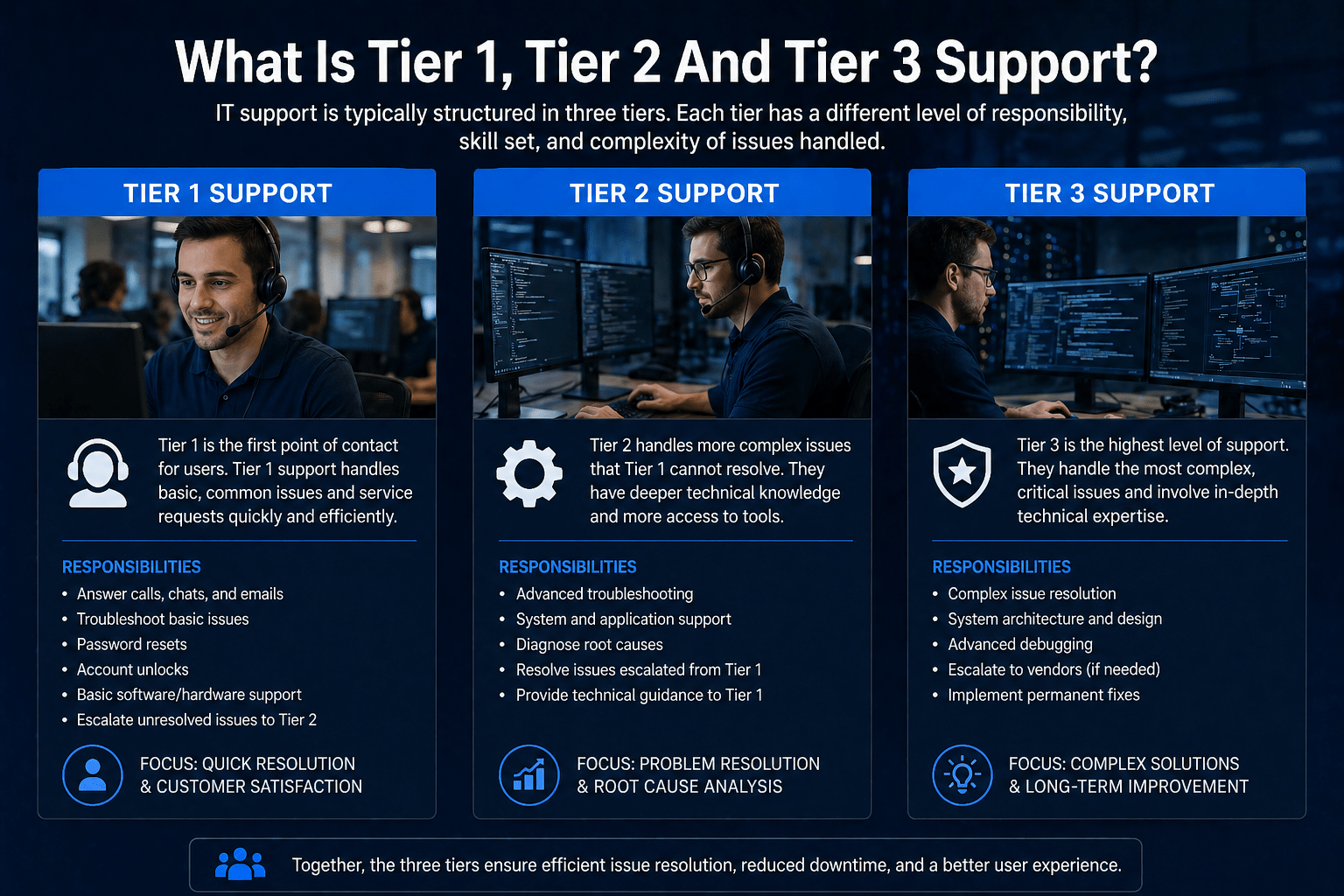
IT support is structured in tiers, levels of increasing specialization that issues pass through based on their complexity. Tier 1 handles common, straightforward problems. Tier 2 handles issues requiring more technical depth. Tier 3 handles complex, escalated, or specialized problems that require expert-level knowledge.
The tiered structure exists because not every IT problem requires the same level of expertise to resolve. Routing every issue to a senior engineer wastes expert capacity on simple tasks. Routing complex issues to first-level support wastes time and frustrates users. The tier structure balances efficiency with expertise by matching issue complexity to technician capability.
The Resource Allocation Problem Tiers Solve
IT support organizations receive requests across a wide range of complexity. Some are trivially simple, a forgotten password. Some require expert-level engineering, a network outage affecting an entire data center. Routing all requests through the same people produces one of two bad outcomes: overqualified engineers spend time on simple tasks, or underqualified technicians work on problems they cannot solve.
Tiers separate those request types and route them to the right people. Simple, high-volume requests go to Tier 1. Complex, lower-volume issues that exceed Tier 1 capability go to Tier 2. Specialized, expert-level issues go to Tier 3. The result is faster resolution across the board: simple issues do not wait behind complex ones, and complex issues get appropriate expertise faster.
Understanding what each tier covers, and how escalation between tiers works, helps businesses evaluate the depth and structure of their IT support services.
Tier 1 Support: First-Line Resolution
Tier 1 is the initial point of contact for all IT support requests. Tier 1 technicians handle high-volume, commonly recurring issues that can be resolved with standard knowledge and documented procedures.
What Tier 1 handles:
- Password resets and account unlocks
- Basic software troubleshooting (application won’t open, slow performance)
- Email configuration and basic Microsoft 365 issues
- Printer and peripheral connectivity
- Basic network connectivity (can you ping the gateway, is Wi-Fi connected)
- New user device setup from standard images
- Ticket creation, triage, and initial diagnosis
What good Tier 1 looks like from your perspective: fast acknowledgment, clear communication about what they are doing, and resolution of most issues without a callback or a wait.
Tier 1 performance metrics. The key Tier 1 metric is first-contact resolution rate, the percentage of issues resolved without escalation. A high-performing Tier 1 team resolves 70 to 80 percent of all incoming issues at first contact, typically within minutes to an hour. Lower rates indicate either under-skilled technicians or over-complex issue types being routed to Tier 1.
Tier 2 Support: Technical Depth
Tier 2 receives escalations from Tier 1 and handles issues requiring deeper technical knowledge, more complex diagnostic work, or access to additional systems and tools.
What Tier 2 handles:
- Advanced software and application troubleshooting
- Network configuration and connectivity issues beyond basic connectivity
- Server and infrastructure performance issues
- Security tool configuration and minor security incidents
- Complex Microsoft 365 and cloud platform issues
- Device management and policy troubleshooting
- Issues that Tier 1 has attempted and could not resolve
What good Tier 2 looks like from your perspective: updates while the issue is being worked, faster resolution than if you had stayed at Tier 1, and a real explanation of what was wrong and what was fixed.
Tier 2’s role in escalation. When Tier 1 cannot resolve an issue within a defined timeframe, typically 30 minutes to an hour for most MSPs, it escalates to Tier 2 with documentation of what was attempted and what was found. Tier 2 picks up with that context rather than starting from scratch. Resolution at this level typically takes hours to a business day, depending on the issue.
Tier 3 Support: Expert and Specialized Resolution
Tier 3 is the highest level of internal support, engineers with deep specialization in specific technologies who handle the most complex issues. Some MSPs also use Tier 3 to describe vendor escalation, engaging Microsoft, Cisco, or other vendor support for issues requiring vendor expertise.
What Tier 3 handles:
- Major infrastructure failures and outages
- Complex security incidents and breach response
- Advanced network engineering issues
- Database and application architecture problems
- Cloud platform engineering
- Issues escalated from Tier 2 that require expert-level specialization
- Vendor coordination for issues requiring manufacturer or developer support
For cybersecurity incidents specifically, Tier 3 is where incident response happens, the engineers who investigate, contain, and recover from security events.
What good Tier 3 looks like from your perspective: clear communication about severity and timeline, expert-level investigation, and a post-resolution explanation of what happened and what was changed to prevent recurrence. Resolution may take days for genuinely complex issues.
How Escalation Should Work
Good escalation has three characteristics:
- Timely triggers. Issues should escalate to the next tier when it becomes clear they exceed the current tier’s capability, not after they have stalled for hours with no progress.
- Documentation handoff. The escalating technician provides context, what the user reported, what was tested, what was found, so the receiving technician can continue without re-interviewing the user.
- User communication. The user is notified that the issue is being escalated, who is handling it next, and what the expected timeline is.
Poor escalation, delays, lost context, re-explaining the problem to multiple technicians, is one of the most common user complaints about IT support.
Why Tier Structure Matters for Service Quality
A well-structured tier system produces:
- Faster resolution for common issues (Tier 1 handles them efficiently)
- Appropriate expert engagement for complex issues (Tier 2 and 3 are not wasted on password resets)
- Accountability for escalation timing (SLAs define when escalation should trigger)
- Knowledge development (Tier 1 technicians build skills that qualify them for Tier 2 work over time)
A poorly structured tier system, where all issues go to the same queue regardless of complexity, or where Tier 1 holds issues too long before escalating, produces slow resolution and user frustration.
What Tier Structure Reveals About an MSP
When evaluating a managed IT services provider, the tier structure reveals its operational maturity. Ask directly:
- Does the provider have defined Tier 1, 2, and 3 capabilities, or is everything handled by the same pool of generalist technicians?
- Are escalation triggers documented, or is escalation informal and inconsistent?
- Does the provider have genuine Tier 3 specialization, security engineers, cloud architects, network engineers, or does “Tier 3” just mean calling vendor support?
Providers with mature tier structures deliver faster, more consistent resolution. Providers without them deliver variable outcomes depending on who happens to pick up the ticket.
Final Takeaway
IT support tiers match issue complexity to technician expertise, producing faster resolution and more appropriate use of specialized capacity. Understanding the tier structure of a managed IT provider, and how escalation is triggered, documented, and communicated, reveals the operational maturity behind their support delivery.
Tiered IT Support From Mindcore Technologies
Mindcore’s IT support services are structured with defined Tier 1, 2, and 3 capabilities, documented escalation procedures, and SLA commitments at each tier. Part of our comprehensive managed IT services engagement.

