

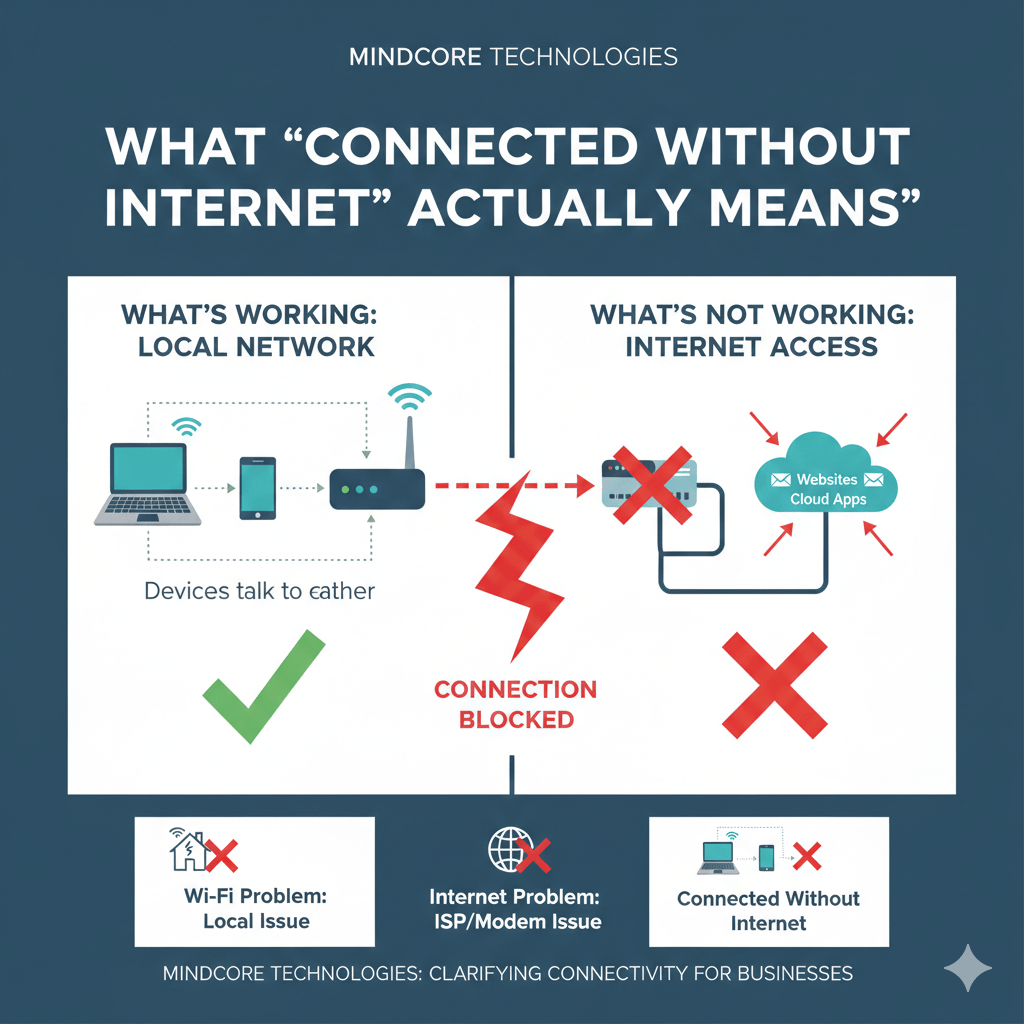
“Connected without internet” does not mean your device is broken. It means one layer of connectivity is working while another is failing. Most users assume Wi-Fi equals internet. Technically, those are separate systems, and when they fall out of sync, this message appears.
At Mindcore Technologies, we see this message during outages, misconfigurations, and security incidents. Understanding what it actually means lets you fix the problem quickly instead of guessing.
This article explains what’s working, what isn’t, why it happens, and how to resolve it systematically.
The Plain-English Explanation
When you see “Connected without internet”:
- Your device is connected to a local network (usually Wi-Fi or Ethernet)
- That local network cannot reach the internet
Your laptop can talk to the router.
The router cannot talk to the outside world.
What Is Still Working When You See This Message
Even without internet access, you may still be able to:
- Connect to Wi-Fi successfully
- See other devices on the same network
- Print to a local printer
- Access local servers or NAS devices
This confirms the local network layer is functioning.
What Is Not Working
What’s failing is the path beyond your network, such as:
- The modem or ISP connection
- DNS resolution
- Firewall or gateway routing
- ISP authentication
Websites, cloud apps, and email fail because traffic never leaves your network.
The Most Common Causes (In Order of Likelihood)
1. ISP or Modem Outage
The most frequent cause.
Signs:
- All devices affected
- Wi-Fi still shows connected
- Router lights indicate a WAN problem
Fix:
- Check ISP status
- Restart modem
- Contact provider if the issue persists
2. Router Can’t Reach the Internet
Your router is powered but not routing traffic.
Common reasons:
- Misconfigured WAN settings
- Expired ISP lease
- Firmware bug
Fix:
- Restart the router
- Check WAN status in router settings
- Update firmware if accessible
3. DNS Is Broken
The internet may be reachable, but names can’t be resolved.
Symptoms:
- IP-based sites may work
- Browsers say “no internet”
- DNS errors appear
Fix:
- Change DNS servers (temporarily)
- Restart network services
- Verify firewall or security appliance settings
4. Captive Portal or Authentication Failure
Common on public or hotel Wi-Fi.
What happens:
- You’re connected but not authorized
- Internet access is blocked until login
Fix:
- Open a browser
- Visit a non-HTTPS site to trigger the login page
- Complete authentication
5. Firewall or Security Device Blocking Traffic
Seen in business environments.
Causes include:
- Misconfigured firewall rules
- Expired security licenses
- Blocked outbound traffic
Fix:
- Check gateway alerts
- Verify outbound rules
- Restart or fail over if available
6. IP Address or Gateway Issues
Your device is connected but improperly configured.
Symptoms:
- Self-assigned IP address
- Missing default gateway
Fix:
- Renew IP address
- Restart network adapter
- Check DHCP server availability
Why This Message Confuses So Many People
Operating systems simplify the explanation.
Instead of saying:
“Local network OK, upstream connectivity failed”
They show:
“Connected without internet”
This leads users to troubleshoot the wrong thing, usually Wi-Fi signal or speed, when the problem is upstream.

How to Tell If It’s a Wi-Fi Problem or an Internet Problem
It’s Likely Wi-Fi If
- Only one device is affected
- Signal drops or fluctuates
- Moving closer to the router helps
It’s Likely Internet If
- All devices show the same message
- Wi-Fi stays connected
- Local devices still communicate
This distinction saves time.
Security Implications People Miss
This message can also appear when:
- Internet access is intentionally blocked
- A firewall isolates a device
- Network access control denies external traffic
In business environments, this may indicate:
- Policy enforcement
- Device posture failure
- Quarantine due to security risk
It is not always an accident.
Quick Fix Checklist (Safe Order)
- Check if other devices are affected
- Restart modem (wait 60 seconds)
- Restart router
- Test DNS by pinging a public IP
- Check ISP status
- Review firewall or gateway alerts
Do not reset equipment blindly unless necessary.
Why Businesses See This More Often Than They Should
In business environments, “connected without internet” often reveals:
- Single points of failure
- No backup internet
- Poor monitoring
- Overly aggressive security rules
The message itself is harmless. The lack of visibility behind it is not.
How Mindcore Technologies Prevents This Scenario
Mindcore helps organizations reduce and diagnose these issues by implementing:
- Redundant internet connections
- Proper gateway monitoring
- Secure but resilient firewall rules
- Clear separation of Wi-Fi and internet layers
- Alerting before users notice outages
We design networks where this message is rare and quickly explained when it appears.
A Simple Reality Check
If you cannot immediately tell:
- Whether the problem is Wi-Fi or internet
- Whether it’s local or ISP-related
- Where to look first
Your network lacks operational clarity.
Final Takeaway
“Connected without internet” means your device is talking to the local network, but the network cannot reach the outside world. It is not a mystery. It is a layered failure.
Understanding the difference between Wi-Fi, routing, DNS, and ISP connectivity turns this message from frustration into a fast diagnosis. For businesses, it also highlights where resilience and monitoring need improvement.
Frequently Asked Questions
What does “connected without internet” mean?
“Connected without internet” means your device is successfully connected to a local network, such as Wi-Fi or Ethernet, but that network cannot reach the public internet. The local connection is working, while the upstream path through the modem, router, gateway, DNS, or internet service provider is failing.
Your device may still communicate with the router and other local resources. The failure occurs beyond the local connection, so troubleshooting should focus on upstream connectivity rather than assuming the Wi-Fi connection itself is broken.
What causes a “connected without internet” message?
Common causes of a “connected without internet” message include ISP outages, modem or router failures, DNS problems, captive portal issues, firewall restrictions, and incorrect IP or gateway settings. The issue may affect one device or an entire network, so identifying the scope helps narrow the cause.
If every device is affected, investigate the modem, ISP connection, router, or gateway first. If only one device has the problem, review its IP configuration, network settings, authentication status, and security controls.
Can devices still communicate without internet access?
Yes. Devices on the same local network can often still communicate with printers, servers, shared storage, and other internal resources even when internet access is unavailable. This happens because local network communication can continue even when the router or gateway cannot reach external services or websites.
For example, employees may still access an internal server or network printer during an internet outage. This confirms that local connectivity remains operational even though external websites, cloud applications, and email may be unavailable.
How can businesses reduce internet connectivity problems?
Businesses can reduce internet connectivity problems by using redundant internet connections, proactive monitoring, resilient firewall configurations, backup failover options, and properly managed network infrastructure. These measures improve visibility, reduce single points of failure, and help IT teams identify outages or routing problems before they significantly disrupt operations.
Monitoring WAN, DNS, firewall, and gateway health can help teams identify where a failure occurs. Backup internet connections can also maintain access when the primary provider experiences an outage.
Can cybersecurity controls intentionally block internet access?
Yes. Cybersecurity controls can intentionally block internet access through firewall rules, network access control, device quarantine, DNS filtering, or conditional access policies. In business environments, this may happen when a device fails security checks, violates policy, or is isolated to prevent potential risk from spreading across the network.
If a managed business device suddenly loses external access while other devices remain connected, IT should review security alerts and policy enforcement before users change network or firewall settings.
Matt Rosenthal’s Expertise in Network Reliability and Connectivity
Matt Rosenthal, CEO of Mindcore Technologies, has extensive experience helping organizations improve network reliability, cybersecurity, and operational resilience. His expertise in managed IT services, cloud infrastructure, and secure network architecture helps businesses quickly identify connectivity failures, reduce downtime, and maintain stable access to critical systems. Matt focuses on designing environments with proactive monitoring, layered security, and resilient infrastructure so organizations can resolve connectivity issues faster while maintaining business continuity.

