

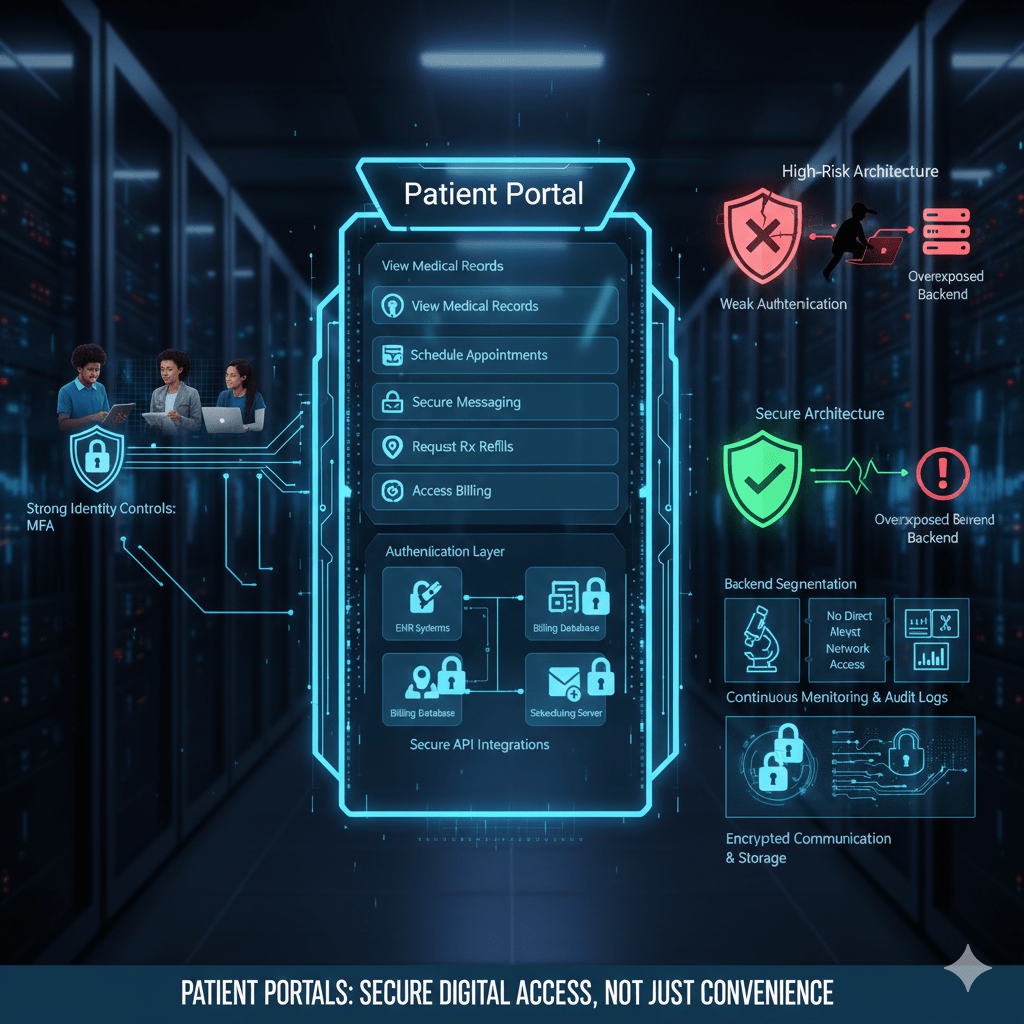
A patient portal is not just a convenience feature. It is a direct digital access point into clinical systems, billing records, messaging platforms, and protected health information. If it is poorly designed or loosely secured, it becomes a primary attack surface.
In modern healthcare, patient portals sit at the front edge of the organization’s digital footprint. They connect external users, patients, caregivers, and sometimes third-party integrations directly to internal systems.
At Mindcore Technologies, we evaluate patient portals as high-value assets. They contain PHI, authentication data, communication history, and financial records. That makes them attractive targets.
What Is a Patient Portal?
A patient portal is a secure online platform that allows patients to interact with their healthcare provider electronically.
It typically allows patients to:
- View medical records and test results
Lab results, imaging summaries, medication lists, and visit history. - Schedule or manage appointments
Including cancellations and confirmations. - Communicate securely with providers
Through encrypted messaging systems. - Request prescription refills
Linked directly to EHR workflows. - Access billing statements and payment history
Including insurance information.
The portal acts as a digital extension of the clinical and administrative environment.
How a Patient Portal Actually Works
A patient portal is not a standalone system. It connects to multiple backend components.
Technically, it operates through:
- Authentication Layer
Users log in using credentials, often protected by multi-factor authentication. - Application Layer
The portal interface presents structured views of health data pulled from backend systems. - Integration Layer
APIs connect the portal to EHR, billing, scheduling, and messaging systems. - Database Layer
Underlying clinical data remains stored within the organization’s EHR or cloud-hosted systems.
The portal does not usually store primary medical records independently. It retrieves and displays them securely.
What Data Flows Through a Patient Portal
Patient portals handle sensitive information, including:
- Protected Health Information (PHI)
Diagnoses, medications, lab results, visit summaries. - Personally Identifiable Information (PII)
Names, addresses, dates of birth, insurance details. - Authentication Credentials
Login data, password resets, security questions. - Payment Information
Billing history and transaction records. - Secure Messaging Content
Conversations between patients and providers.
Because portals combine identity and health data, they are high-value targets.
Why Patient Portals Are Targeted
Attackers target patient portals because:
- They are internet-facing systems
Unlike internal EHR environments. - They provide direct PHI access
Successful compromise yields immediate data value. - Credential reuse is common
Patients often reuse passwords across platforms. - Account recovery workflows can be exploited
Weak verification processes create entry points. - They offer credential harvesting opportunities
Fake portal phishing pages are common.
A compromised portal account may expose sensitive patient information immediately.
Common Patient Portal Security Risks
Healthcare organizations often overlook structural risks.
These include:
- Weak authentication enforcement
Lack of mandatory MFA increases credential compromise risk. - Insecure API integrations
Poorly configured connections expose backend systems. - Overly broad session timeouts
Sessions remain active too long on shared devices. - Inadequate monitoring of login anomalies
Suspicious access may go undetected. - Insufficient encryption configuration
Misconfigured TLS settings create vulnerabilities.
Portals must be treated as critical infrastructure.
How To Secure a Patient Portal Properly
Securing a patient portal requires layered controls.
1. Enforce Strong Identity Controls
Authentication is the first line of defense.
Organizations should:
- Require multi-factor authentication for all portal users
Especially for sensitive actions like viewing records or updating information. - Implement secure password policies with monitoring for reuse
Detect compromised credentials through threat intelligence feeds. - Use adaptive authentication mechanisms
Trigger additional verification for unusual access patterns. - Harden account recovery workflows
Prevent social engineering abuse.
Identity control reduces the most common breach path.
2. Limit Backend Exposure
The portal should never expose internal systems.
IT teams must:
- Use application-layer access controls instead of direct network access
Preventing portal users from reaching internal infrastructure. - Segment EHR systems from portal interfaces
So compromise does not cascade. - Restrict API permissions tightly
APIs should access only necessary data elements. - Eliminate unnecessary direct database connectivity
Reduce lateral movement risk.
Containment prevents escalation.
3. Encrypt All Data in Transit and at Rest
Encryption must be consistent.
Organizations should:
- Enforce modern TLS configurations
Preventing downgrade attacks. - Encrypt stored data and backups
Protecting against ransomware and theft. - Secure API communications with token-based authentication
Avoiding static credentials.
Encryption ensures confidentiality even during interception attempts.
4. Monitor Portal Activity Continuously
Visibility protects patient trust.
Healthcare IT teams should:
- Log every login attempt and record access
Including identity and timestamp. - Detect abnormal patterns
Such as multiple failed logins or unusual geographic access. - Monitor for credential stuffing attempts
Automated login attacks are common. - Centralize portal logs into security monitoring systems
Avoid isolated logging silos.
Monitoring must be proactive, not reactive.
5. Secure Third-Party Integrations
Patient portals often integrate with payment processors or telehealth vendors.
To reduce risk:
- Use secure API gateways
Controlling and monitoring external access. - Limit data exchange to minimum necessary fields
Preventing overexposure. - Audit third-party access regularly
Vendor integrations must remain visible. - Enforce contractual security requirements
Aligning partners with HIPAA standards.
Third-party integrations expand the attack surface significantly.
How Patient Portals Fit Into HIPAA Compliance
HIPAA requires:
- Controlled access
- Transmission security
- Audit controls
- Data integrity
- Incident response readiness
Patient portals must align with all five.
Portal misconfiguration often becomes a compliance event.
How Mindcore Technologies Secures Patient Portal Architectures
Mindcore helps healthcare organizations secure patient portals by:
- Conducting architectural reviews of portal integration points
Identifying backend exposure paths. - Implementing identity-driven access controls
Reducing credential abuse risk. - Segmenting portal infrastructure from clinical systems
Limiting lateral movement. - Strengthening monitoring and anomaly detection
Catching suspicious activity early. - Aligning portal security with HIPAA technical safeguards
Ensuring audit readiness.
The focus is secure digital access without compromising usability.
A Practical Patient Portal Risk Check
Your patient portal may be high-risk if:
- MFA is optional
- Portal APIs connect directly to backend systems
- Login anomaly monitoring is limited
- Account recovery processes are weak
- Portal and EHR systems share network space
- Incident response planning excludes portal scenarios
These are architectural warning signs.
Final Takeaway
A patient portal is a critical digital front door into healthcare systems. It connects external users to internal data and must be secured with the same rigor as core clinical infrastructure.
Strong identity enforcement, backend segmentation, encryption, continuous monitoring, and controlled integrations are essential to protecting patient trust and regulatory standing. Organizations that treat patient portals as convenience tools expose themselves to significant risk. Those that architect them carefully strengthen both access and confidentiality in a digital-first healthcare environment.
