

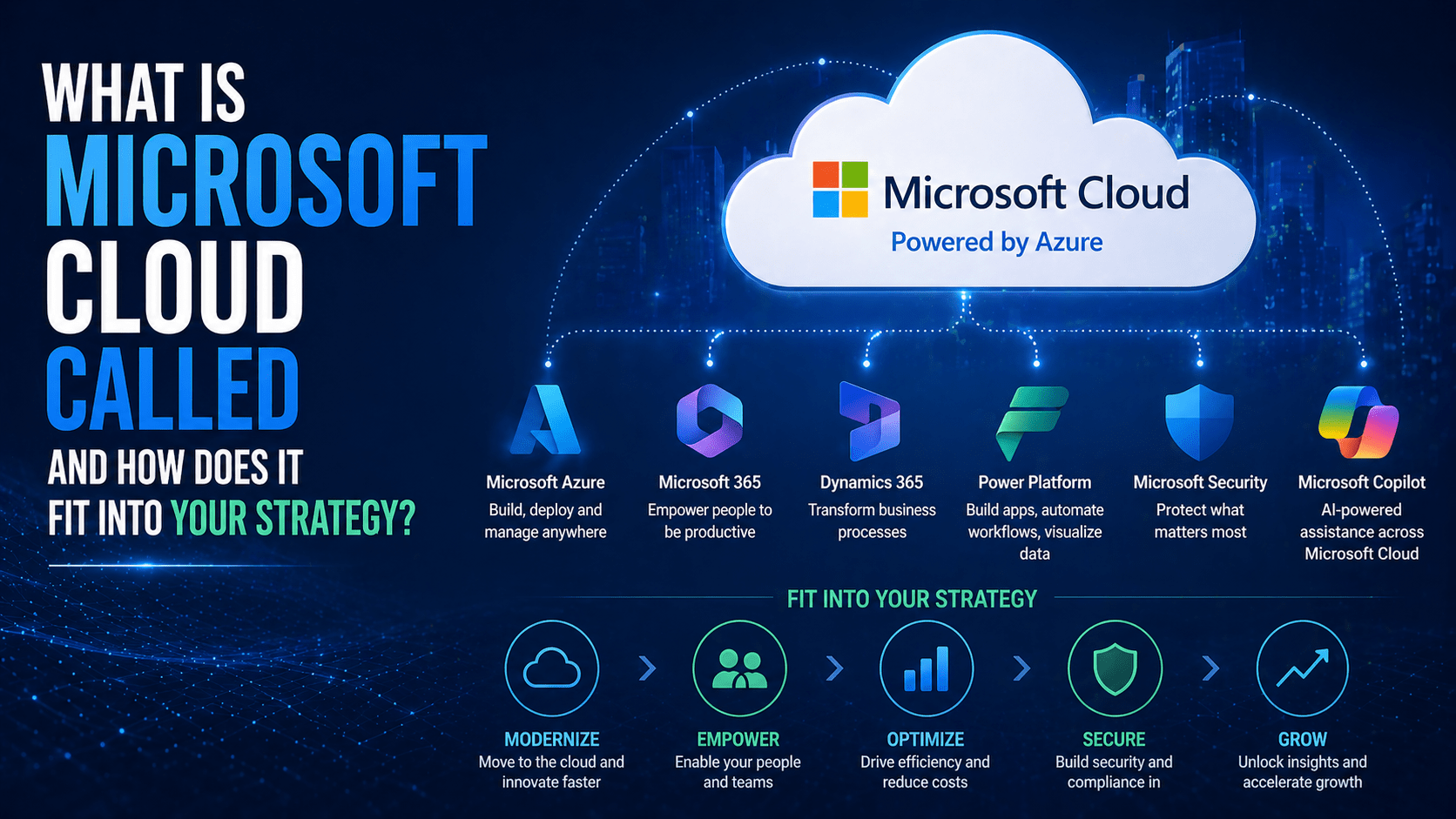
Microsoft’s cloud infrastructure is called Microsoft Azure. But “the Microsoft cloud” as most businesses experience it is broader than Azure alone — it encompasses Azure (infrastructure and platform services), Microsoft 365 (productivity and collaboration), and Dynamics 365 (business applications). Together, these three clouds form the Microsoft commercial cloud, and for organizations operating primarily in the Microsoft ecosystem, understanding how they relate to each other is foundational to cloud strategy.
Overview
Microsoft operates three distinct cloud platforms that serve different functional domains:
- Microsoft Azure: cloud infrastructure (IaaS, PaaS), developer tools, AI services, and enterprise data platform
- Microsoft 365: productivity, collaboration, communication, and security (formerly Office 365)
- Dynamics 365: business applications — ERP, CRM, field service, and HR
All three run on Microsoft’s global cloud infrastructure. All three integrate with Azure Active Directory (now Entra ID) for identity. All three can be connected to create workflows and data flows across business processes. For most SMBs and mid-market organizations, the Microsoft cloud strategy primarily involves Azure and Microsoft 365, with Dynamics 365 relevant for organizations that use Microsoft’s business application suite.
The 5 Why’s
- Why is it important to distinguish Azure from Microsoft 365 when discussing “Microsoft cloud”? Azure and Microsoft 365 serve different functions, have different pricing models, and have different IT ownership responsibilities. Microsoft 365 is the productivity platform most employees interact with daily. Azure is the infrastructure platform that IT uses to host servers, run applications, and manage identity. Treating them as the same thing produces confusion about costs, security responsibilities, and strategy.
- Why is Microsoft Entra ID (formerly Azure Active Directory) specifically the connector between all three clouds? Every Microsoft cloud service — Azure, Microsoft 365, and Dynamics 365 — uses Azure Entra ID for user authentication. When a user signs into Teams, they authenticate against Entra ID. When a developer accesses an Azure subscription, they authenticate against Entra ID. When a salesperson logs into Dynamics 365, they authenticate against Entra ID. The identity platform is the single integration point that makes all three clouds part of one coherent ecosystem.
- Why does Microsoft 365 Business Premium specifically represent the most complete cloud strategy for SMBs within the Microsoft ecosystem? Microsoft 365 Business Premium includes productivity apps (Word, Excel, Teams), cloud services (Exchange Online, SharePoint, OneDrive), security tools (Defender for Business, Intune, Conditional Access), and identity management (Azure AD Premium P1). For SMBs without large IT teams, this plan provides a defensible security posture and a complete productivity platform without requiring separate Azure infrastructure management.
- Why does Azure specifically matter even for organizations that primarily use Microsoft 365 and not Azure infrastructure services? Microsoft 365 is powered by Azure infrastructure — SharePoint, Exchange, and Teams all run on Azure data centers. Azure Entra ID is the identity foundation. Microsoft Defender uses Azure-based threat intelligence. Organizations using Microsoft 365 are using Azure whether or not they have explicit Azure subscriptions. Understanding this helps organizations make sense of security architecture, identity configuration, and compliance responsibilities.
- Why do organizations with on-premises infrastructure specifically need Azure in their cloud strategy rather than Microsoft 365 alone? On-premises servers, Active Directory, and legacy applications need cloud infrastructure — not just productivity applications — to move to the cloud or extend to a hybrid model. Azure Virtual Machines replace on-premises servers. Azure Entra ID Connect synchronizes on-premises Active Directory to the cloud. Azure Backup and Azure Site Recovery provide cloud-based data protection for on-premises systems. Microsoft 365 covers the application and productivity layer; Azure covers the infrastructure layer.
How the Microsoft Cloud Fits Into IT Strategy
For SMBs (1-300 Employees)
Core Microsoft cloud stack:
- Microsoft 365 Business Premium: productivity, collaboration, email, and security in one plan
- Azure (optional for most SMBs): may use Azure Backup for on-premises systems, Azure Virtual Desktop for specific use cases, or Azure-hosted custom applications
Strategy: Microsoft 365 Business Premium provides a defensible, complete productivity and security platform. Azure supplements where specific infrastructure requirements exist.
For Mid-Market Organizations (300-2,000 Employees)
Core Microsoft cloud stack:
- Microsoft 365 E3 or E5: enterprise productivity, advanced security, and compliance
- Azure: hosting for migrated on-premises servers, Azure Active Directory Domain Services for cloud-native identity, Azure Backup, Azure Site Recovery, potentially Azure Virtual Desktop
- Dynamics 365 (if applicable): CRM and ERP for organizations replacing Salesforce or SAP with Microsoft’s business applications
Strategy: Azure provides the infrastructure foundation for workloads migrated from on-premises. Microsoft 365 handles productivity and security. Entra ID connects them.
For Enterprise Organizations
All three clouds are typically deployed: Microsoft 365 for productivity, Azure for infrastructure and developer platforms, and Dynamics 365 for business applications, with deep integration between them through Power Platform and Azure data services.
Microsoft Cloud Cost Considerations
- Microsoft 365: per-user monthly subscription; Business plans range from ~$6 to ~$22/user/month; E plans are higher
- Azure: consumption-based; costs depend entirely on services used
- Dynamics 365: per-user per-app monthly; specific pricing varies by application
- Microsoft 365 Lighthouse: free tool for MSPs managing multiple Microsoft 365 tenants
- Azure Cost Management: built-in tool for monitoring and optimizing Azure spending
Final Takeaway
The Microsoft cloud is Azure for infrastructure, Microsoft 365 for productivity and security, and Dynamics 365 for business applications. For most businesses, the strategic question is which combination of these three platforms — at what plan tiers — provides the capabilities they need at a cost and management complexity they can sustain. Microsoft 365 Business Premium is the starting point for most SMBs; Azure becomes relevant as infrastructure needs emerge.
Design Your Microsoft Cloud Strategy With Mindcore Technologies
Mindcore Technologies works with organizations to design and implement Microsoft cloud strategies — Microsoft 365 licensing, Azure infrastructure, and the integration between them that produces a coherent, secure, and cost-effective Microsoft cloud environment.
Talk to Mindcore Technologies About Your Microsoft Cloud Strategy →
Contact our team to assess your current Microsoft environment and design the cloud strategy that fits your business needs and IT capabilities.

