

Most businesses use both every day without separating the two, and that confusion shows up later as overspend, security gaps, and stalled projects.
Definition: Cloud computing is the delivery of computing resources, servers, storage, databases, and networking over reliable business internet connectivity. Cloud services are the applications and managed offerings built on top of that infrastructure. Cloud computing is the underlying capability. Cloud services are what your team actually logs into and uses each day.
Getting this distinction right changes what you buy, who manages it, and where your compliance obligations sit. The sections below define each term, compare them side by side, and give you a six-step framework for deciding which one your next project needs.
What Cloud Computing Covers
Cloud computing is the infrastructure layer. Instead of buying servers and racking them in your own building, you rent capacity from a provider and pay for what you consume. Your team decides how that capacity is configured.
There are three standard service models, and the difference between them is how much you manage versus how much the provider manages:
- Infrastructure as a Service (IaaS): You rent raw compute, storage, and networking, then build on top of it. Examples include AWS EC2 and Azure Virtual Machines. You control the operating system, patching, and architecture, which means you also own the security configuration.
- Platform as a Service (PaaS): You get a managed environment for building and running applications without maintaining the servers underneath. Examples include Azure App Service and Google App Engine. Useful when you have developers but no interest in infrastructure operations.
- Software as a Service (SaaS): You subscribe to a finished application and the provider runs everything behind it. Examples include Microsoft 365, Salesforce, and Zoom.
Those three models sit on a spectrum. IaaS gives the most control and carries the most operational responsibility. SaaS gives the least control and the fastest time to value. Most mid-market organizations end up running a mix, which is why our cloud services work usually starts with an inventory of what is already in place.
What Cloud Services Covers
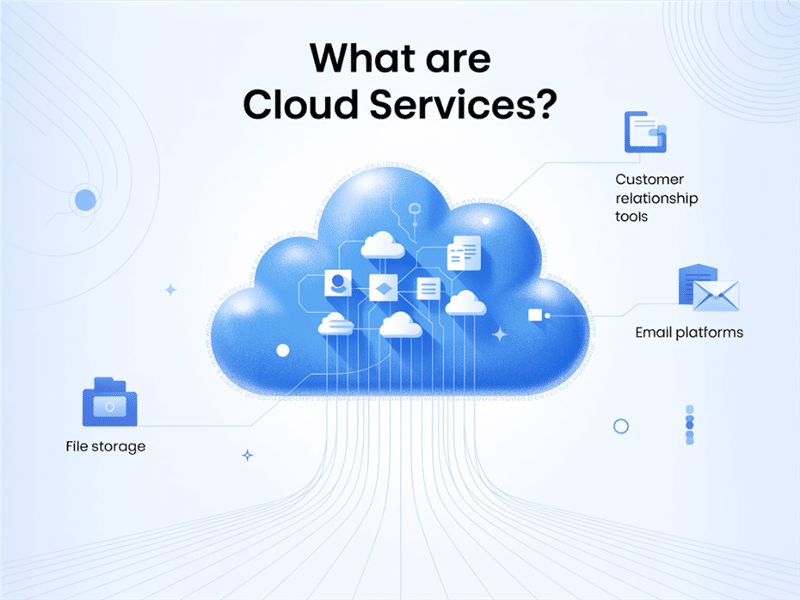
Cloud services are the delivered outcomes: the applications, platforms, and managed offerings that run on cloud infrastructure. When someone asks what cloud services are, the practical answer is the tools your business already depends on:
- File storage and collaboration: Cloud-based storage options such as SharePoint, OneDrive, Google Drive, and similar platforms can replace or supplement traditional on-premises file servers.
- Business applications: CRM systems, ERP platforms, accounting software, and industry-specific tools delivered through a browser.
- Communication and email: Microsoft 365, Teams, and hosted voice platforms.
- Managed cloud services: Monitoring, backup, patching, identity management, and security operations delivered by a provider rather than staffed internally.
That last category is the one businesses most often overlook. Buying cloud infrastructure does not include someone managing it. If nobody on your team owns patching, access reviews, and backup verification, those tasks simply do not happen, which is where cloud security becomes a separate line item rather than an assumed feature.
Key Differences Between Cloud Computing and Cloud Services
Knowing the difference between the two will help you make wiser decisions when it comes to technology. Here is how they do differ:
Purpose and Function
Cloud computing works behind-the-scenes technologies; it powers everything from services, storage up to processing. While cloud services are the products you use: say CRM systems, video conferencing apps, and data analytics tools.
Who Uses It?
While IT teams and developers would ordinarily take care of cloud computing, it gives them power and control regarding how systems are built. Cloud services are meant for business users-such as sales teams, marketing, admin, or maybe even customers.
Level of Control
Cloud computing has a higher degree of customization. You build the system to meet the requirement. Cloud services are rather limited by customization but faster in use.
Why This Distinction Matters for Your Business
Understanding the difference makes for selecting correct tool. Full control of infrastructure is not always necessary for every business. Most of them only require simple reliable applications that would do their respective jobs. However, this may change for most industries, for example those which create their own customized tools or need high speed and flexibility; such industries might rather appreciate more the benefits cloud computing provides.
It determines which provider will be best for services in the clouds. Some provide better ready-made tools while others give access to full control, deep configurations options. Knowing your needs helps you in easier selection.
Examples in the Real World
Let’s try to understand the actual businesses that are using cloud computing and cloud services:
Software Development
A software development team uses Amazon Cloud Services (more precisely, AWS EC2) for creating virtual servers, custom configuring networks, and deploying applications. In setting up this way, they have complete control over everything, including scaling their resources according to demand. The whole working scheme allows them flexibility, speed, and the opportunity to build anything from the ground up. That is what cloud computing is about.
Marketing Agency
Marketing agencies work with cloud services such as HubSpot for Customer Relationship Management, Trello for project management, and Slack for inter-team communication. These are plug-and-play solutions – no technical setup is needed, so the team is free to focus on their central pursuit of marketing rather than managing technical infrastructure.
Accounting Firm
A local accounting firm uses Microsoft 365, which shows their hybrid approach. They use cloud services for email (Outlook), document storage (OneDrive), and collaboration tools (Teams) while Microsoft manages the underlying cloud computing infrastructure behind the curtain.
Businesses can integrate Cloud Computing Services with custom cloud environments to enhance workflow efficiency, demonstrating how Cloud Computing Services work alongside infrastructure to optimize operations. The foundation technology is the cloud computing infrastructure, and the cloud services that complement its use are the user-friendly tools that ride on this infrastructure.
How They Work Together
There is no need for companies to elect between cloud computing or cloud services — they can use of both. A company might create a custom app on Google Cloud (cloud computing) and apply off-the-shelf tools to handle day-to-day jobs (cloud services). The computing part provides the backbone for smooth operation, while the right services are there to make quick and easy work.
This combination enables companies to develop strong creative solutions and leverage an IT cloud service to use powerful tools effortlessly. It blends strength and ease to match any goal.
Choosing the Right Solution for Your Business
Here’s a quick guide:
- Choose cloud computing if you need custom setups, app development, or full control over your environment.
- Choose cloud services if you want ready-to-use solutions for collaboration, storage, or communication.
When comparing providers, understanding their strengths in delivering either full infrastructure or ready-made services can help you choose what fits your business best.
Also, it helps to understand how cloud computing differs from cloud services before picking a provider. This way, you’ll know if your business needs power and flexibility—or just simplicity and speed.
Final Thoughts
Cloud computing and cloud services go hand in hand though not the same thing. The former is the engine while the latter is the product. Differentiating these helps you get rid of the tech headache as well as build the setup appropriate for the business.
Whether you’re looking to be in full control, get quick access, or both, knowing how the cloud tools fit in together gives you a huge advantage. And if you’re just starting out, learning how businesses use cloud services in their day-to-day operations will paint a clearer picture of what’s possible.
Perhaps your current tools feel slow or outdated, maybe hard to manage, and it’s time to switch.
Frequently Asked Questions
What is the difference between cloud computing and cloud services?
Cloud computing is the infrastructure layer: compute, storage, databases, and networking delivered over the internet. Cloud services are the applications and managed offerings built on top of it. Cloud computing is the capability you configure. Cloud services are what your team logs into and uses each day.
The distinction matters because it determines three things: what you are actually buying, who is responsible for operating it, and where your compliance obligations land. A business that buys infrastructure when an application would have done ends up paying for capacity nobody manages. A business that buys applications when it needed infrastructure hits a ceiling it cannot configure past.
What are the three types of cloud computing?
The three types are Infrastructure as a Service, Platform as a Service, and Software as a Service. They differ in how much of the stack you manage. IaaS gives the most control and the most operational responsibility. SaaS gives the least control and the fastest time to value.
PaaS sits between them, giving developers a managed runtime without server maintenance. Most mid-market organizations run all three at once without having chosen deliberately, which is why an inventory is usually the first step. Our cloud services engagements start there.
Is Microsoft 365 cloud computing or a cloud service?
Microsoft 365 is a cloud service, specifically Software as a Service. Microsoft owns and operates the cloud computing infrastructure underneath it, including the servers, storage, and networking. You subscribe to the finished applications and manage users, permissions, and data rather than any infrastructure.
This is the clearest illustration of the two layers in one product. It also explains why a Microsoft 365 tenant still needs active administration: the platform is Microsoft’s responsibility, while identity, permissions, retention, and data protection remain yours. Permission sprawl inside SharePoint and OneDrive is one of the most common findings in an Office 365 migration.
Does cloud computing include security and management?
No. Under the shared responsibility model, the provider secures the underlying platform while you remain responsible for identity, access, configuration, and data. Buying capacity does not include anyone patching it, reviewing access, or verifying backups. Those tasks need a named owner, internal or through a managed provider.
This is the single most expensive misunderstanding in cloud buying. The provider guarantees the hardware and the hypervisor. Everything above that line is yours, and the line is not always where buyers assume. Confirm by name who owns patching, access reviews, backup verification, and incident response before signing anything. If the answer is nobody, that is a finding, not a detail. Cloud security is a separate scope of work for exactly this reason.
Which is better for a business, cloud computing or cloud services?
Neither is better in general. Choose cloud services when an existing application already meets the requirement, which covers most business needs. Choose cloud computing when the workload is specific to your business and no vendor product fits, and you have confirmed who will operate it.
The order of the decision matters more than the answer. Define the workload and the compliance requirement first, then let those constrain the technology. Teams that pick the platform first end up justifying it afterward, which is how firms acquire infrastructure they cannot staff.
Cloud Infrastructure and Digital Transformation Expertise from Matt Rosenthal
Matt Rosenthal, CEO of Mindcore Technologies, has extensive experience helping organizations modernize operations through secure and scalable cloud strategies. His expertise in cloud architecture, infrastructure optimization, cybersecurity, hybrid environments, and operational resilience helps businesses align cloud computing technologies with real operational and growth objectives. His leadership focuses on designing cloud transformation frameworks that improve scalability, simplify infrastructure management, strengthen security governance, and support long-term digital modernization initiatives.

