

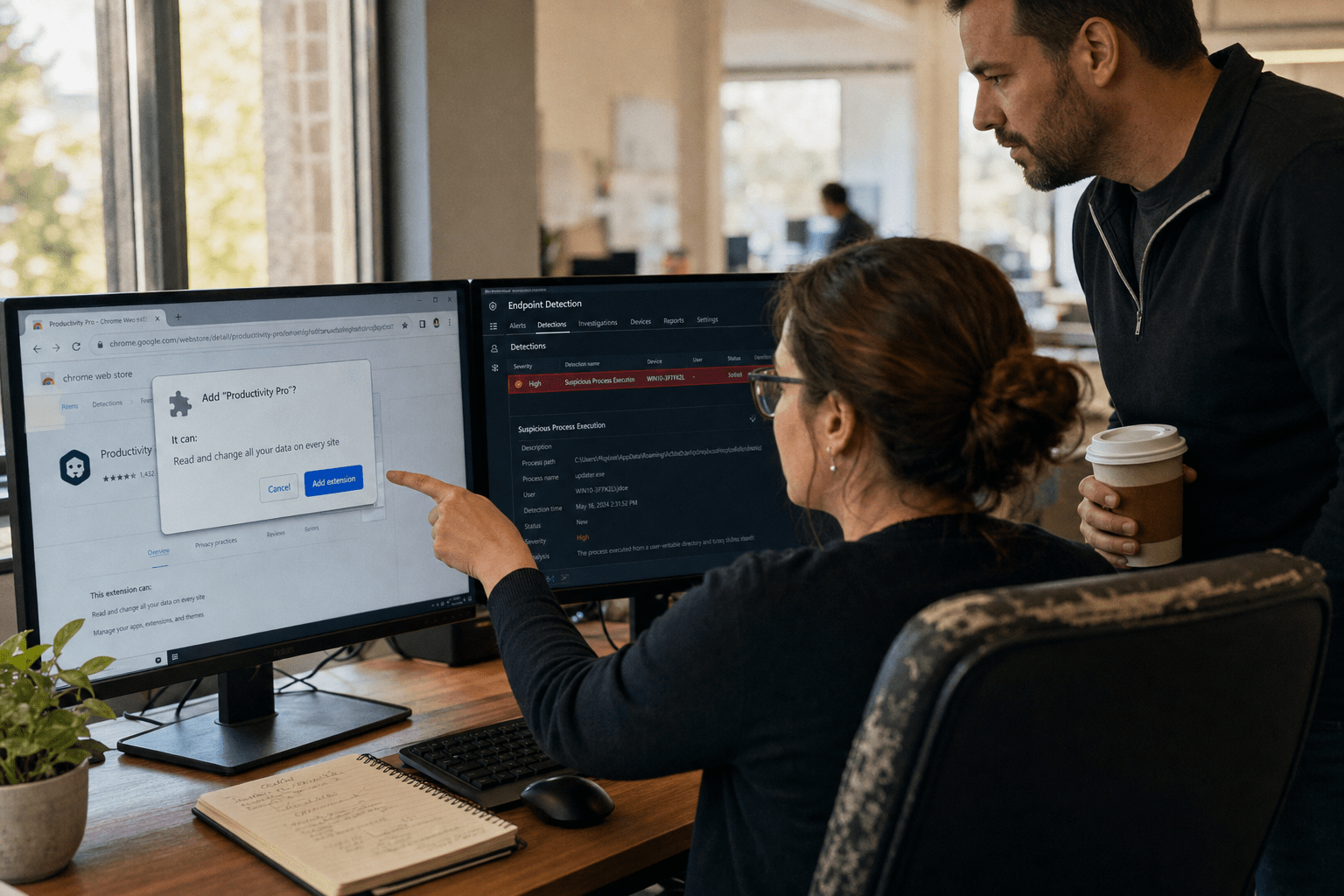
Malware disguised as AI tools is malicious software that impersonates a legitimate AI assistant, browser add-on, or model file so an employee installs it voluntarily. Security researchers tracked more than 92,000 attacks worldwide in the first four months of 2026 using fake AI branding, with roughly 33,000 of those reaching small and midsize business endpoints, close to five times the same window in 2025. Fake ChatGPT packages account for about half of the detections, with Claude and Gemini impersonations splitting most of the rest. The payloads are ordinary: banking trojans, credential stealers, remote-access backdoors, and downloaders that pull ransomware later. What is new is the wrapper, and the wrapper is what defeats a small company’s defenses.
The Five Things Every Owner Should Take From This
Our team works with 10 to 500 employee firms across managed IT and security engagements, and the fake-AI-tool pattern shows up the same way almost every time. Five points carry the rest of this article.
- Your staff are the delivery mechanism, and they are not being careless. They are searching for a tool leadership never gave them, and the attacker has bought the ad above the real result.
- This is four attack paths, not one. Cloned desktop installers, malicious browser extensions, typosquatted AI domains, and trojanized model files or code packages all wear the same costume.
- Code signing and a working product prove nothing. The most effective campaigns of the past year shipped software that did what it advertised while a second process ran quietly underneath.
- The gap is approval, not antivirus. Every one of these installs happened because no one owned the question of which AI tools the company permits.
- A ten minute vetting pass stops most of it. Publisher, install base, permission set, and download origin catch the majority of fakes before anything executes.
Why Malware Disguised as AI Tools Reaches SMB Endpoints First
Malware disguised as AI tools lands on small business endpoints ahead of enterprise ones because smaller firms combine high AI curiosity with no software approval process, and attackers optimize for exactly that pairing. In a 2,000 seat company, an employee who wants an AI meeting summarizer files a request and waits. In a 40 seat company, that same employee searches, clicks, and installs inside five minutes, usually on a machine that also holds the accounting file and the client contract folder. One has a gate, the other does not.
The economics favor the attacker too. A landing page, a logo, a plausible domain, and a signed installer are a weekend of work, and the brand does the persuading. We wrote about how attackers are using automation to scale that production in our breakdown of AI powered malware and AI generated threats, and the same tooling is now aimed at the download itself rather than the email.
How SEO Poisoning and Sponsored Results Do the Delivery
Fake AI tool downloads reach users mainly through paid search placements and manipulated organic results, not through email attachments. The pattern is consistent in incident review. An employee searches for a well known AI assistant by name. The first result is a sponsored listing with the correct product name, correct logo, and a domain that reads correctly at a glance. The page looks like the real product page because it usually is the real product page, copied.
There is a fair argument that this makes the threat easy to solve. Tell people to type the vendor’s address directly and the whole chain collapses. That argument holds for the five or six major AI brands an employee already knows by name. It falls apart for everything else, which is most of the market. When somebody wants a tool that turns a recording into meeting notes, they do not know the vendor’s name yet. Search is the discovery step, which means the poisoned result arrives before the user has any reference point for what the real thing looks like. Direct navigation is worth teaching. It is not worth relying on.
Why Code Signed Fake AI Utilities Pass a First Look
A valid code signature confirms that someone paid for a certificate, and nothing more about intent. The most instructive campaign of the past two years shipped a family of fake AI utilities that were properly signed and genuinely functional. The image converter converted images. The AI chat wrapper answered questions. Users had no reason to suspect anything, because from the user’s seat nothing was wrong. The backdoor ran as a second process, established persistence, and waited.
The counterargument deserves airtime, since signature and reputation checks do real work. They stop the crude repacks, and they give an endpoint tool something to score. But signature checks answer the question “did a known entity build this” rather than “should this run here.” That gap is why we lean on behavioral detection and application control for our managed security services clients instead of treating a clean signature as a verdict. A signed process making outbound connections to infrastructure nobody recognizes is still a finding, and the difference between malware families matters less than owners expect, a point we cover in ransomware or malware, how is it different.
Seven Risks of Malware Disguised as AI Tools SMBs Miss in 2026
The seven risks below are the ones that get overlooked in post incident reviews, ranked by how often we find them and how long they sit undetected before anyone notices.
1. Full conversation history theft. Two browser extensions impersonating a popular AI productivity add-on passed 900,000 installs before removal in early 2026 and exfiltrated complete chat histories across more than 20,000 business tenants. Those histories held pasted contracts, source code, pricing models, and client names. No file left the network, so no file-based control triggered.
2. Credential capture through browser permissions. A malicious extension that requests network-rules permissions can reroute traffic and read what the user types. One recent fake AI search add-on pushed queries through a lookalike domain built to resemble a legitimate vendor’s address. Session tokens and typed passwords travel the same path.
3. Delayed ransomware staging. A downloader is not a payoff, it is a foothold sold onward. The install is quiet for weeks, then a separate group arrives with encryption. Owners tend to date the breach from the encryption event, which is why recovery scoping runs short. Our post on what ransomware decryption tools can and cannot do walks through why the timeline matters more than the tooling.
4. Data loss that no monitoring tool sees. Content typed into a browser add-on never becomes a file transfer, an email, or an upload. Most small business monitoring watches those three channels. This is the invisibility problem researchers keep flagging about AI add-ons, and it is real.
5. Trojanized model files and code packages. Development-adjacent teams pull model weights and helper libraries from public registries. Poisoned packages carrying AI-flavored names execute on install, inside a developer machine that usually holds production access.
6. Impersonation of your own brand downstream. Stolen mailbox access and stolen client lists get reused. The fake tool that landed on your bookkeeper’s laptop becomes the vendor-payment fraud your customer reports next quarter.
7. Shadow AI as a standing hole. The single install is the symptom. The condition is that nobody owns the approval question, so the next tool arrives the same way. This is the risk we spend the most time on, because fixing it retires the other six.
How Shadow AI Turns One Bad Install Into a Governance Problem
Shadow AI is any AI tool in use inside a company that nobody formally reviewed or approved, and it converts a single bad install from an incident into a pattern. We usually find it during discovery on a new engagement, not during an investigation. A browser inventory comes back with eleven AI add-ons across nineteen machines, none on any list, several with permissions broad enough to read every page the user opens. Nobody hid anything. There was no place to declare it.
The Browser Extension Nobody Approved
Browser add-ons carry more risk than desktop installs at small companies because they sit inside the authenticated session and often escape endpoint inventory entirely. An extension with permission to read and change site data sees the bank portal, the payroll app, and the CRM record already logged in. It does not need to break authentication, it inherits it.
The reasonable objection is that browser stores review submissions and remove bad actors. They do, and they have pulled campaigns with hundreds of thousands of installs. The removal simply arrives after the harvest. Review at store scale is largely automated, and a well built impersonation clears it, collects for months, and gets pulled once a researcher publishes. Store presence is weak evidence of safety, and an install count is not a reference. We treat add-on permissions as an access grant and inventory them the same way we inventory user accounts, which for most clients happens under a co-managed IT arrangement where the internal team keeps day to day control and we own the review cadence.
Trojanized Model Files and Poisoned Packages
Model files and public code packages deserve the same suspicion as an executable, because in practice they behave like one. Certain model serialization formats run code on load rather than simply reading data, and package installs execute setup scripts by design. A registry entry named to resemble a well known AI library, off by a character, gets pulled by a developer in a hurry.
This is where the honest limits of the advice show. Small firms cannot audit model provenance the way an AI lab can, and telling a three person development team to build a supply chain review program is not useful. What works at this size is narrower: pin versions, install from a private mirror where you can, and keep development machines off the same flat network as finance. We think through the tooling side of that in AI cybersecurity tools and your security arsenal, and the broader question of whether the assistants themselves hold up under attack in are AI tools like GPT and Claude vulnerable to cyberattacks.
How We Vet AI Tools Before Staff Install Them
Vetting an AI tool takes about ten minutes and catches most impersonations, provided somebody is assigned to do it before the install rather than after. The point is to give staff somewhere to go that is faster than gambling on a search result.
The Ten Minute Vetting Pass
Run these in order and stop at the first failure.
- Confirm the publisher against the vendor’s own site. Open the vendor address directly, then follow their link to the download or store listing. Never travel in the other direction.
- Check the domain character by character. Hyphens inserted, letters swapped, and unusual endings are the tell. A lookalike address is the single most common signal in the incidents we review.
- Read the permission request out loud. An add-on that summarizes a page does not need to change network requests or read data on every site. Mismatch between the stated job and the requested access is disqualifying.
- Look at install age and volume together. A tool with 400,000 installs and a two month history is a warning, not a reference.
- Check that it appears in the vendor’s documentation. Real products get written about by their own makers.
- Log the approval. One shared list of permitted AI tools, with an owner. This is the control that stops the next one.
The First Hour After You Find One
Move on containment before analysis. Take the machine off the network rather than shutting it down, since a shutdown discards memory evidence. Reset credentials for every account that was authenticated in that browser profile, treating session tokens as compromised even where the password was not. Check outbound connection logs from that host for the past 30 days, because the install date and the discovery date are rarely close. Then review whether the same add-on or package reached other machines, which is usually how a single finding becomes five. Filtering at the network edge, which is what our managed firewall service covers, is what gives you those outbound logs in the first place.
Frequently Asked Questions
How can I tell if an AI tool download is malware before I install it?
Verify the publisher by starting at the vendor’s own address and following their link outward, never by trusting a search result or advertisement. Then compare the permissions the tool requests against the job it claims to do. A mismatch between stated purpose and requested access is the most reliable early signal available to a non-specialist.
Are malicious AI browser extensions more dangerous than fake desktop installers?
For most small businesses, yes, because an extension operates inside sessions the user has already authenticated and frequently sits outside endpoint software inventory. A desktop installer usually leaves traces an endpoint tool can score. An add-on reading page content produces no file transfer, so file-based monitoring never triggers.
Does antivirus stop malware disguised as AI tools?
Partially. Reputation and signature checks catch crude repacks, but the effective campaigns of the past two years shipped code-signed software that worked as advertised while a second process ran underneath. Behavioral detection and an approved-software list close more of that gap than signature checking alone.
What is shadow AI and why does it matter for a small company?
Shadow AI is any AI tool employees use that nobody formally reviewed or approved. It matters because it is the condition that allows a fake tool to install in the first place. Companies with an approval list and a named owner see far fewer of these incidents, regardless of company size.
Should we simply block all AI tools at work?
Blanket blocking tends to push usage onto personal devices, where you have no visibility at all. A short list of approved tools, a fast approval path for new requests, and add-on permission review gives you more real control than a prohibition your team quietly works around.
Talk Through Your AI Tool Exposure With Our Team
The companies handling this well are not the ones with the largest security budgets. They are the ones where somebody owns the question of which AI tools are permitted, and where that answer arrives fast enough that staff use the process instead of a search engine. Four delivery paths, seven downstream risks, and one gap underneath all of them, which is approval. Antivirus renewals and staff warnings do not close it, because the install was never an accident.
If you do not currently know which AI tools are running inside your business, that is the honest starting point, and it is where most of our clients started. We can walk your environment, inventory what is actually installed, and give you a permitted-tool list your team will use. Our guide to outsourced cybersecurity protection covers how that engagement typically runs. When you are ready, book a free strategy call and we will take it from where you are.
Written by Mark, Mindcore Technologies.

