


Knowing What to Do After a ransomware attack in the first 24 hours is critical, as early actions determine whether your business recovers effectively or faces further damage. Isolate infected machines without powering them off, call your incident response team and cyber insurer before you touch anything else, and preserve the forensic evidence that recovery, claims, and law enforcement all depend on. Most small and midsize businesses lose recovery options in the first hour by rebooting a server or wiping a workstation. This guide walks the exact sequence we run with SMB clients when the ransom note appears.
The Five Things That Decide Your Outcome
Before the step-by-step, here are the five principles that separate a contained incident from a business-ending one. We have run these on real engagements for IT managers and CISOs who were tired of generic checklists.
- Isolate, do not power off. Pulling the network cable stops the spread. Powering down wipes the memory that holds encryption keys and attacker artifacts.
- Call before you click. Your incident response (IR) team, your cyber insurer, and your legal counsel all need to hear from you in the first hour, in that order.
- Evidence is the asset. Logs, memory images, and the ransom note itself are what your insurer and the FBI need. Destroy them and you lose the claim.
- Do not pay yet, and maybe not at all. Payment is a business and legal decision, never a panic reflex, and it rarely happens in the first 24 hours.
- Backups are only useful if they are clean. Restoring from a backup the attacker already touched reinfects everything.
The reader for this guide is an IT manager or owner at a 10 to 500 person firm who just found encrypted files and a countdown timer. The pain is real and the clock is loud. The goal here is to give you the calm, ordered sequence we use, so the next hour works for you instead of against you.
How to Contain Ransomware Without Destroying Your Recovery Options
Properly following What to Do After a Ransomware Attack includes isolating infected systems without shutting them down to stop malware spread while preserving forensic evidence. This is the single most misunderstood step, and it is where most SMBs go wrong before help even arrives.
Why Powering Off Is the Mistake That Costs Recovery
The instinct to shut everything down is understandable, and there is a real argument for it. Powering off a machine stops active encryption on that device immediately, and for a single home computer that may be the right call. Some response guides written for individuals recommend it for exactly that reason.
For a business, the calculus flips. A live machine holds volatile memory, and that memory can contain the encryption keys, the attacker’s tooling, and the network paths they used. Our team has recovered decryption material directly from RAM on engagements where the client kept the machine powered on. Shut it down and that evidence is gone forever, which can mean the difference between restoring files and paying a ransom. Both sides have a point, so the honest answer depends on context: for a single isolated device with no backups and active encryption you can argue for power-off, but for a networked business environment, keep it running and pull it off the network instead.
How to Isolate Infected Systems the Right Way
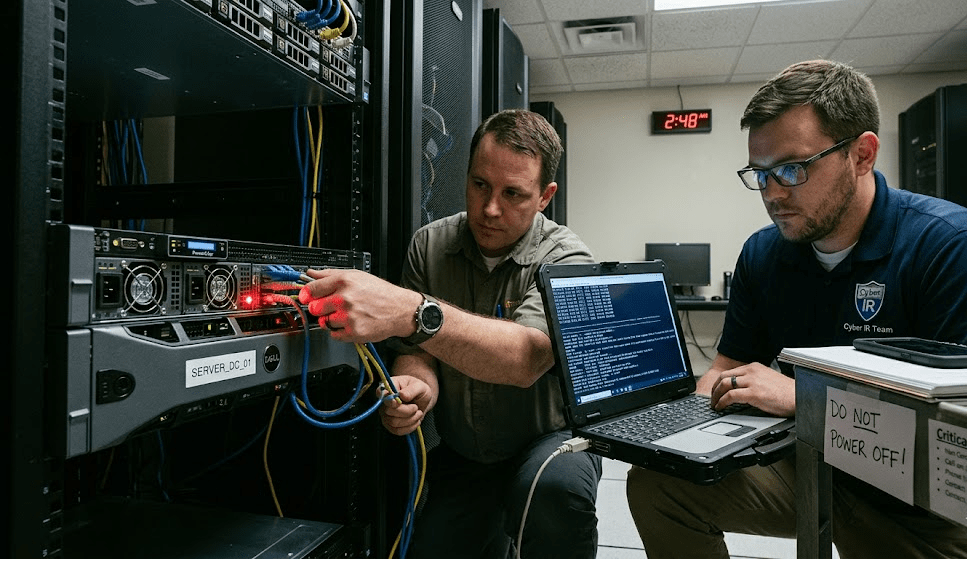
Isolating infected systems means severing their network connection while preserving their running state. Unplug the ethernet cable, disable the wireless adapter, and remove the device from any virtual network segment. Do not log in, do not run antivirus scans, and do not open the encrypted files to “check” them.
Work outward from there. Disconnect shared drives and network storage so encryption cannot reach them across the file shares. Suspend automated backup jobs immediately, because a scheduled backup running mid-attack will overwrite your last clean copy with encrypted data. If you use cloud sync tools like OneDrive or Dropbox, pause syncing so the encrypted versions do not propagate to the cloud and to every other synced device.
When to Pull the Whole Network Versus One Machine
The choice between isolating one machine and segmenting the entire network depends on how far the attack has spread. If you caught it on a single workstation and your monitoring shows no lateral movement, isolating that one device may hold the line. We rarely see it stay that contained.
Ransomware operators move laterally fast, often within minutes of initial access. If you see encryption on more than one system, or you cannot confirm the blast radius, segment aggressively. Disable the affected VLAN, shut down the switch port range, or in a small flat network, disconnect the internet uplink entirely while you assess. The cost of over-isolating is a few hours of downtime. The cost of under-isolating is the rest of your servers. For a deeper look at how these attacks propagate, our guide on how to protect your network from ransomware attacks covers the lateral movement patterns we see most.
Who to Call First After a Ransomware Attack
Understanding What to Do After a Ransomware Attack emphasizes calling your incident response team, insurer, and legal counsel in the correct order during the critical first hour. Calling in the wrong order can void your insurance coverage or compromise legal privilege, so the sequence is not arbitrary.
Why Your Cyber Insurer Comes Before Your IT Vendor
Most cyber insurance policies require you to notify the carrier before you engage any outside response firm, and skipping that step can reduce or void your payout. This surprises people. You would think you call the technical experts first, and there is logic to that since every minute counts.
The catch is that insurers maintain panels of approved IR firms, forensic investigators, and breach counsel. If you hire your own vendor before notifying the carrier, the carrier may refuse to reimburse those costs, and on a six-figure recovery that matters enormously. Our recommendation reconciles both pressures: have your insurer’s 24/7 breach hotline number saved before you ever need it, so the “call the insurer first” step takes five minutes and unlocks the approved IR team immediately rather than slowing you down. If you have an internal IR team or a managed security partner, loop them in parallel for containment while the insurance call happens, since containment and notification are not mutually exclusive.
How to Engage Incident Response and Legal Counsel
Incident response and breach counsel work together, and engaging counsel early can place the forensic investigation under legal privilege. Your IR firm handles the technical work: scoping the breach, imaging affected systems, identifying the ransomware variant, and mapping what the attacker accessed. Breach counsel handles the legal exposure, including notification obligations if customer or employee data was taken.
Engaging the IR firm through counsel, rather than directly, can protect the resulting forensic report under attorney-client privilege in some jurisdictions. That matters if the incident leads to litigation or regulatory scrutiny later. For the leadership view on coordinating these roles under pressure, our tips for CIOs on how to respond to a ransomware attack breaks down the decision-making side.
When to Notify Law Enforcement and Regulators
Notify federal law enforcement as soon as containment is underway, and assess regulatory deadlines within the first 24 hours. In the United States, report to the FBI through the Internet Crime Complaint Center and to CISA via the federal ransomware reporting channel. Reporting does not obligate you to do anything else, and law enforcement may have decryption keys or intelligence on the specific group that attacked you.
Regulatory clocks are tighter than most teams expect. Depending on your industry and the data involved, you may face breach-notification deadlines measured in days. HIPAA, state data-breach laws, and contractual obligations to clients can all apply at once. This is exactly why breach counsel joins early, so you are tracking those deadlines from hour one rather than discovering them in week two.
How to Preserve Evidence for Insurance and Forensics
Preserving evidence after a ransomware attack means capturing system images, logs, and the ransom note before anyone remediates, because that evidence drives your insurance claim, the forensic investigation, and any law enforcement case. Once you wipe and rebuild, the evidence is gone, and so is much of your negotiating position.
What Evidence Matters Most in the First Day
The highest-value evidence is the volatile and time-sensitive data that disappears the moment systems change state. That means memory images from infected machines, which is the technical reason we keep them powered on and isolated rather than shut down. It also means the firewall, VPN, and authentication logs that show how the attacker got in and where they went.
Capture the ransom note exactly as it appears, including the file names, the ransom demand, and any attacker contact details or onion addresses. Photograph screens with a phone if you cannot export cleanly. Save copies of a few encrypted files and their original extensions, because identifying the ransomware variant often depends on those samples, and a known variant sometimes has a free public decryptor. The CISA “I have been hit by ransomware” guidance lists the same preservation priorities we follow on engagements.
How to Document the Timeline Without Contaminating It
Documentation is critical, but how you document determines whether the record helps or hurts. Keep a written incident log from the first moment, recording every action, who took it, and the timestamp. There is a real tension here, because the people best positioned to document are the same people doing the containment, and asking them to stop and write slows the response.
The resolution we use is to assign one person as scribe who does not touch keyboards. They record decisions and actions in a shared document stored off the affected network, so the log itself is not encrypted or altered. Avoid editing files on the compromised systems, since changing timestamps or metadata can undermine both the forensic analysis and the integrity of the evidence. The goal is a clean, chronological record that an investigator and an insurer can both trust. Our broader ransomware attacks resource collects the documentation templates we hand clients during onboarding.
Why Clean Backups Are Not Always Clean
One key step in What to Do After a Ransomware Attack is to validate that your backups are clean and untouched to ensure successful data recovery. That assumption fails more often than it should. Modern ransomware groups dwell in networks for days or weeks before they trigger encryption, and during that window they hunt for and corrupt or delete backups specifically to remove your alternative to paying. Before you restore, your IR team validates that the backup is free of the attacker’s tooling and predates the initial intrusion. Restoring a compromised backup simply reinfects the rebuilt environment, and we have watched organizations go through two full recovery cycles because they skipped this validation the first time. Patience in the first 24 hours protects the restore you will run on day three.
Why Paying the Ransom Is a Day-Three Decision, Not a Day-One Reflex
A crucial aspect of What to Do After a Ransomware Attack is delaying any ransom payment decision until containment, evidence collection, and insurer consultation are completed. Anyone pushing you to pay immediately is working against your interests.
There are legitimate arguments on both sides, and we hold both rather than pretend it is simple. Paying may be the fastest path to a decryptor when backups are gone and downtime is existential. Against that, payment funds criminals, carries no guarantee the decryptor works, can violate sanctions law if the group is restricted, and marks you as a paying target. Federal guidance discourages payment, though it stops short of prohibiting it. The point for your first day is simpler: keep the option open by preserving evidence and engaging counsel, then make the decision later with your IR team, insurer, and lawyers at the table.
Frequently Asked Questions
Should I turn off my computer after a ransomware attack?
For a networked business device, no. Disconnect it from the network but keep it powered on, because the running memory can hold encryption keys and forensic evidence that disappear on shutdown. Powering off may make sense only for a single isolated home machine with no backups and active encryption.
Who should I call first after a ransomware attack?
Call your incident response team and your cyber insurance carrier within the first hour, with the insurer often required before you engage any outside vendor. Many policies will not reimburse response costs if you hire a firm before notifying the carrier. Save your insurer’s 24/7 breach hotline number now, before you need it.
Should I pay the ransom?
Not in the first 24 hours, and possibly not at all. Payment is a business and legal decision involving your insurer, counsel, and IR team, and it carries sanctions risk and no guarantee of recovery. Focus the early hours on containment and evidence so you keep every option open.
Do I have to report a ransomware attack to the government?
Reporting to federal law enforcement is strongly recommended and, depending on your industry and data, may be legally required within a set deadline. Report to the FBI through IC3 and to CISA, and engage breach counsel early to track any regulatory notification clocks. Reporting can also give you access to decryption keys and threat intelligence.
How long does recovery from a ransomware attack take?
Recovery ranges from days to several weeks depending on the spread, the cleanliness of your backups, and how well the first 24 hours preserved your options. Validating backups before restoring adds time but prevents reinfection. The work you do in the first day directly shortens the recovery that follows.
Talk to a Ransomware Response Team Before You Need One
The businesses that recover fastest from ransomware are the ones that decided their first 24 hours in advance. They had the isolation steps written down, the insurer hotline saved, the IR firm on retainer, and the backups tested and air-gapped before an attacker ever showed up. The companies that pay are usually the ones improvising at 2 a.m. with the network still spreading the infection. It is about having the sequence ready so the panic does not make your decisions for you. At Mindcore, we help SMBs build and rehearse that exact playbook, and we stand up the ransomware response capability before the worst day rather than during it. If you want to pressure-test your readiness or you are facing an active incident right now, book a free strategy call and we will walk your first 24 hours with you. The best time to plan the response was before the attack. The second best time is today, and our team on how to be prepared for a cyber attack is a good place to start.
Ransomware Incident Response and First-Hour Recovery Expertise from Matt Rosenthal
Matt Rosenthal, CEO of Mindcore Technologies, has over 30 years of experience guiding SMBs through the critical first 24 hours of a ransomware attack, from network isolation and evidence preservation through insurer notification, law enforcement reporting, and backup validation before any restoration begins. He has seen firsthand how businesses lose recovery options in the first hour by powering down servers, wiping workstations, or restoring from backups the attacker already compromised during weeks of undetected dwell time. Matt leads a team that builds and rehearses ransomware response playbooks with clients before an attack occurs, so the sequence that decides the outcome runs on preparation rather than panic.

