

(Updated in 2026)
If your team still sees desktop infrastructure as “just hardware and licenses,” you are overlooking its biggest operational and security risks. Traditional desktops — whether on-premises or locally managed — are expensive to maintain, difficult to secure consistently, and hard to scale. They create silent exposure paths that attackers exploit because endpoint controls are uneven, patching is delayed, and remote access is poorly governed.
At Mindcore Technologies, we don’t tout Desktop-as-a-Service (DaaS) as a trend — we advocate it as a resilience and defense strategy. True cloud desktop solutions integrate identity governance, endpoint risk posture, monitoring, and continuity with day-to-day productivity.
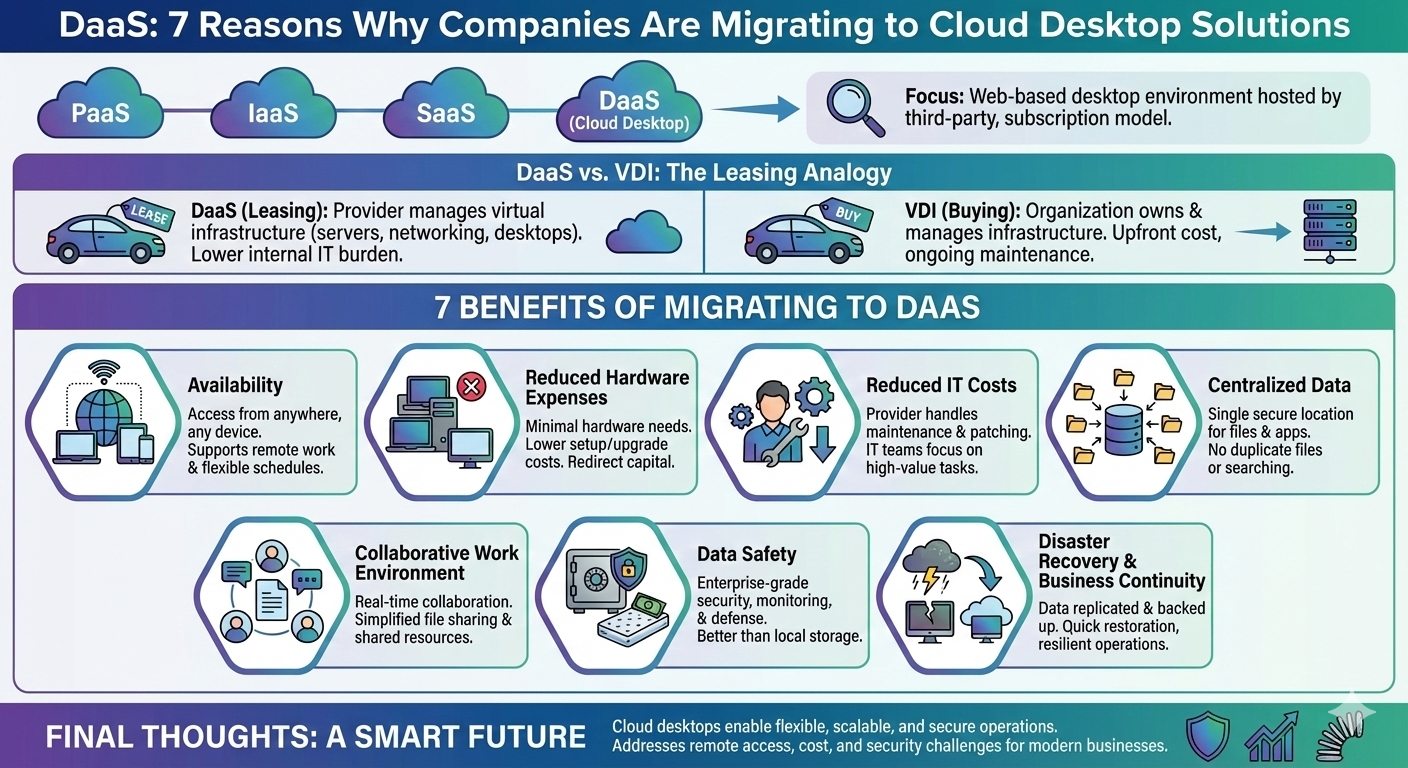
Here are the seven reasons organizations actually migrate to cloud desktop solutions — not for convenience, but for measurable operational and security outcomes.
1. Identity-First Access Controls Across All Workspaces
Legacy desktops trust the device. Cloud desktop solutions trust identity first.
DaaS platforms allow:
- Conditional access policies based on user risk
- Multi-Factor Authentication (MFA)
- Role-based access tied to business function
- Centralized identity enforcement and session governance
This means that access is governed at the identity layer — not at the device level, which is far less defensible.
At Mindcore Technologies, we engineer cloud desktops as identity-defined perimeters, not simply remote endpoints.
2. Consistent, Centralized Security Policies
On-premises desktops quickly diverge in configuration — patch levels vary, policies drift, and vulnerabilities widen.
Cloud desktops allow:
- Uniform patch and update enforcement
- Group policies applied consistently across all sessions
- Standardized security baselines for every user
- Real-time compliance enforcement
This eliminates drift and reduces vulnerabilities that attackers exploit.
3. Resilience and Continuity Built Into Workspace Delivery
Traditional desktops fail silently — hardware breaks, local storage corrupts, and recovery is slow.
Cloud desktop solutions deliver:
- Instant provisioning and reprovisioning
- Data persistence independent of physical devices
- Redundant storage and access paths
- Automated backups integrated with recovery workflows
This ensures continuity even when hardware fails or users lose their primary endpoint.
4. Performance That Scales With Need — Not Budget
On-premises hardware requires upfront capital and sizing projections that often miss actual demand.
Cloud desktop solutions offer:
- Elastic compute and storage
- Load balancing across backend resources
- Scalable session handling
- Lower cost for seasonal or unpredictable demand
This model aligns costs with actual usage — not guesswork.
5. Integrated Threat Detection and Monitoring
Cloud desktops are not islands. They must be integrated into your security operations center (SOC) or monitoring stack.
With DaaS, you can:
- Correlate access events with identity anomalies
- Monitor session behavior for risk signals
- Detect lateral movement from cloud desktop sessions
- Feed workspace logs into SIEM and analytics
This turns workspace use into defensible telemetry, not blind spots.
At Mindcore Technologies, we integrate cloud desktop telemetry with threat detection to give you visibility with context.
6. Improved Compliance and Audit Readiness
Regulations and audit frameworks demand evidence — not hope.
Cloud desktops enable:
- Centralized logging with retention policies
- Audit-ready session trails tied to identity
- Policy enforcement reporting
- Change history with timestamps and ownership
This improves your compliance posture and eliminates labor-intensive evidence gathering.
7. Simplified Hybrid and Remote Work Models
Distributed teams and hybrid models demand consistency. Traditional desktops cannot deliver uniform experiences without complex VPNs and fragmented controls.
Cloud desktops deliver:
- Unified access regardless of location
- Identity-enforced policies at every login
- High-performance access without network backhauls
- Centralized control with local flexibility
This is not just remote access — this is secure, governed hybrid operations.
How Mindcore Technologies Enables Successful DaaS Migrations
Cloud desktop solutions succeed only when they are engineered, monitored, and governed as part of your operational defense strategy — not deployed as siloed utilities.
Mindcore Technologies delivers:
- Identity and access governance integration
Conditional access and MFA tied to policies - Patch and configuration orchestration
Uniform security baselines across all desktops - Threat detection and monitoring
Correlated telemetry across endpoints, identity, and cloud - Continuity and resilience engineering
Redundant access paths and validated recovery - Compliance reporting and audit readiness
Evidence-ready logs and enforcement documentation - Endpoint posture validation
Contextual posture checks before workspace access
This ensures your cloud desktop migration reduces risk and improves operational outcomes — not just moves desktops to a cloud provider.
What You Should Do Before Migrating
If you are considering DaaS, begin with these steps:
- Map current endpoint risk exposure
- Document identity and access policies
- Define compliance requirements and retention needs
- Integrate monitoring pipelines with SIEM
- Test connection performance and scalability
- Validate recovery and continuity workflows
These preparations ensure your cloud desktop migration delivers defensible and measurable improvements.
Final Thought
Cloud desktop solutions are not a convenience — they are a defensive pivot. They replace unmanaged hardware with identity-centric access, consistent security controls, scalability, and telemetry that feeds detection and response workflows.
If your current desktop infrastructure is decentralized, inconsistent, or unmonitored, you are operating behind attackers, not ahead of them.
At Mindcore Technologies, we engineer cloud desktop migrations that are secure, resilient, and aligned with real operational risk — not just technology refresh cycles.
That’s how modern organizations advance workspaces with confidence and control.
