

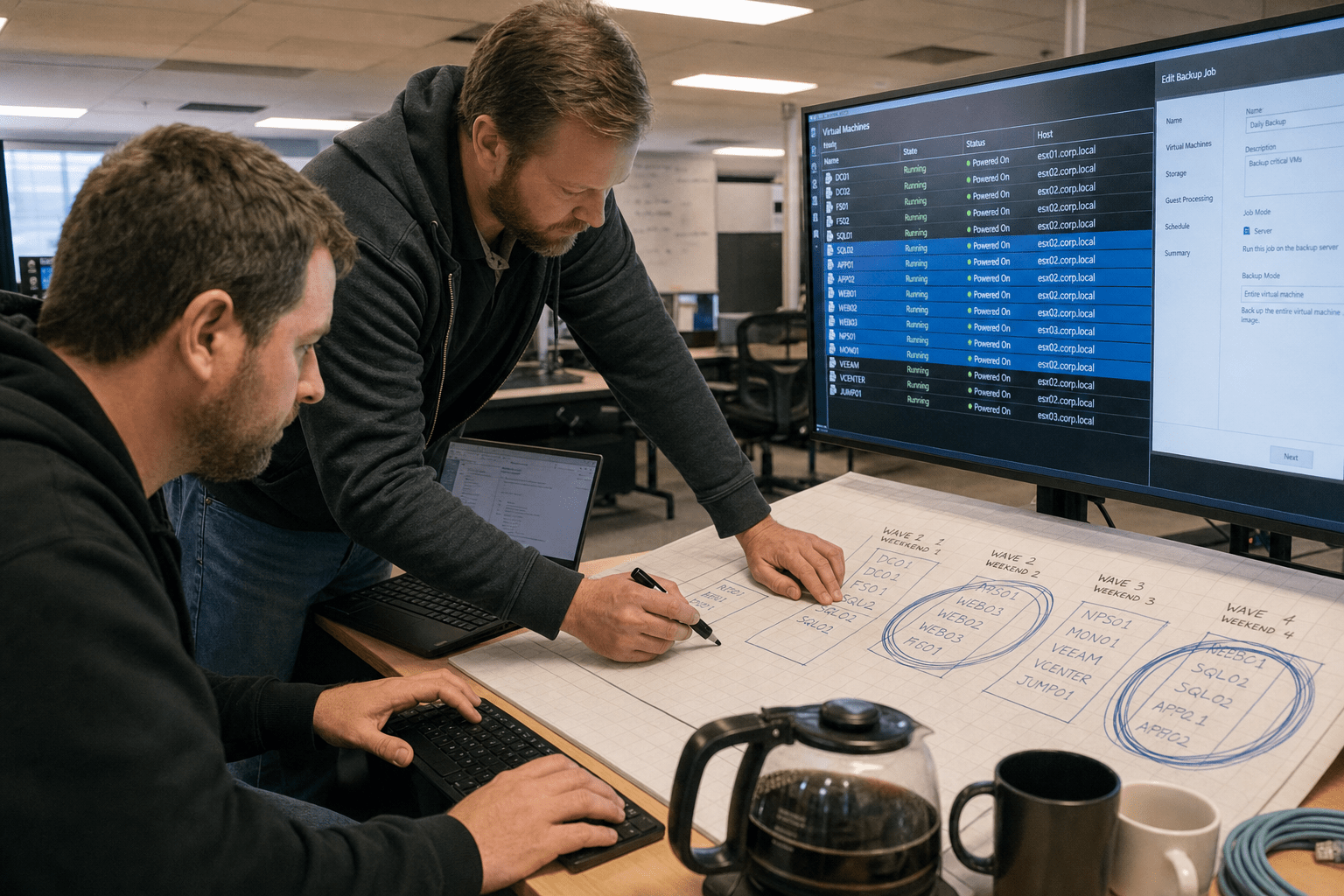
A Hyper-V migration is sized by what is attached to your current hypervisor rather than by how many virtual machines you run. A hundred ordinary Windows and Linux servers move with a tedious but predictable rhythm. What extends the project from six weeks to nine months is the backup product licensed against the platform you are leaving, the monitoring built on its interfaces, the appliance whose vendor certifies one hypervisor, and the three workloads nobody can afford to restart during business hours. If you already run Windows Server, the licensing is largely in hand, and the honest question is not whether you can afford the destination but whether you have scoped the attachments.
The Six Attachments That Decide Your Timeline
Count these rather than your virtual machines, because these are what the schedule is actually made of.
- Your backup product. Licensed and integrated against the current hypervisor, and its replacement or reconfiguration is a project of its own.
- Your monitoring and alerting. Often built on the platform’s own interfaces, so dashboards and thresholds do not travel.
- Vendor-certified appliances. Anything a supplier supports on one hypervisor only, where an unsupported move voids your support agreement.
- Guest tooling inside every virtual machine. Integration drivers have to be swapped, which means touching the inside of each machine rather than just moving the file.
- Workloads that cannot restart in hours. These set your weekend count, and your weekend count sets your calendar.
- Anything with a hardware key or license tied to the host. Application licensing bound to a host identifier will notice the change.
Our cloud migration planning guide covers the cutover discipline that applies to any of these moves.
Why a Hyper-V Migration Stalls on Tooling Rather Than Servers
Virtual machine conversion is largely solved and the surrounding ecosystem is not, which is why project plans built around machine counts are consistently wrong. Moving a server between hypervisors is a well-trodden operation with mature tooling and a predictable failure rate. Re-establishing the protection, visibility, and support posture around those servers is bespoke work every time, because it depends on which products you bought and how they were integrated. Firms that plan the migration as a conversion exercise hit the wall about three weeks in, when the machines are moving fine and somebody realizes the new environment has no working backup. Our overview of what virtualization buys a business is the baseline, and the gap between that and a running production platform is mostly these attachments.
Solve Backup Before You Move One Machine
The migration is not ready to start until protection works on the destination, because a window where production runs unbacked is a risk nobody should accept for convenience. Check whether your existing backup product supports the target hypervisor at the edition you own, since support often exists at a higher tier than a small business licensed. If it does not, you are selecting and implementing a backup product alongside the migration, which is two projects and should be planned as two. Test a restore on the destination platform before the first production machine moves. The counterargument is that a short unprotected window during a controlled migration is an acceptable risk, and for a single non-critical machine it may be. It stops being acceptable the moment the project slips, which projects do, and a two-day window becomes three weeks without anyone deciding.
Expect to Touch the Inside of Every Machine
Guest integration tooling differs between hypervisors, so each machine needs its drivers swapped, which turns a file-level move into an operation inside the operating system. That is the step that makes per-machine effort real rather than nominal. Plan for a reboot, a driver installation, a check that the network adapter came back with the right address, and a functional test by somebody who knows what the application should look like. On a well-documented estate this is fifteen minutes a machine. On an estate where three servers run applications nobody currently understands, it is however long it takes to find someone who does. The objection is that automation tooling handles most of this now, which is largely true for the driver swap and not at all true for the functional test, and the functional test is what catches the migration that technically succeeded.
The Appliances and Licenses That Say No
Some workloads are not yours to move freely, because a vendor’s support agreement specifies a platform and moving outside it leaves you unsupported at exactly the moment you would need support. These are the entries that most often turn a full migration into a hybrid one, and hybrid is the outcome to avoid if you can, since running two platforms costs more than either. Find them before you commit, by listing every virtual appliance and every application whose vendor states a supported hypervisor, then asking each vendor directly rather than inferring from documentation. Our note on avoiding cloud migration pitfalls covers the same class of dependency in a different destination.
Ask the Vendor in Writing, Early
A support statement obtained in writing months before the migration is worth more than a confident answer from a salesperson during it, and the asking often changes the answer. Vendors frequently support more than their published matrix suggests, particularly where a customer asks directly and the platform is mainstream. Equally, some will say no clearly, which is valuable because it lets you plan around one workload rather than discovering the constraint at the end. Put the question specifically: this product, this version, this hypervisor, in production, supported. The reasonable pushback is that vendor responses take weeks and stall your planning. They take weeks whether you ask now or later, which is the argument for asking now, and a firm waiting on two vendor answers can still be doing every other part of the preparation.
Watch for Licensing Bound to the Host
Applications licensed against a host identifier, a MAC address, or a hardware key will notice a platform change, and re-issuing those licenses is usually administrative rather than technical but rarely instant. Older line-of-business applications are the common case, along with anything using a dongle passed through to a virtual machine, which may not pass through the same way on the destination. Identify these by asking your application owners what would happen if the server’s underlying hardware changed, a question that surfaces the dependency without needing anybody to understand licensing. Build the re-issue request into the schedule with slack, since these requests tend to go through a vendor’s administrative process rather than its support queue and move at a correspondingly relaxed pace.
Sequencing the Move Around the Business
Your migration calendar is set by the workloads that cannot tolerate a restart during working hours, so count those first and let them determine the shape. If eight of your servers can only move at a weekend and you can realistically use two weekends a month, you have a four-month tail regardless of how efficient the rest of the work is. That arithmetic done early prevents the common failure, which is a plan built on an optimistic weekly rate that collides with reality in month two and loses the team’s confidence. Our cloud migration teams start every scope at the restart-tolerance question for exactly this reason.
Move Something Real, Early, and Watch It for a Week
A first migration wave of genuinely representative machines, left to run for a week under real load, is what tells you whether your plan works. The temptation is to start with the easiest and least important servers, which proves only that the tooling functions. Pick two or three machines that are real but recoverable: something with a database, something with a scheduled job, something users actually touch. Then watch them for a week rather than declaring success at the end of the cutover, because the problems in this class of work are often not immediate. Performance under Monday morning load, a backup that runs differently, a scheduled task that fires on a schedule you did not think about. There is a fair argument that a week per wave is too slow for a large estate, and it is, which is why it applies to the first wave only.
Decide Your Rollback Point Before Each Wave
Knowing in advance how you would put a workload back, and how long that takes, is what lets you migrate on a Friday night without gambling. For most conversions the rollback is simply leaving the source machine intact and powered off until you are satisfied, which is cheap and effective as long as somebody remembers not to reclaim the storage. Write down the date the source can be deleted rather than deleting when space gets tight. The counterargument is that keeping duplicates consumes storage you may need for the destination, which is a real constraint in a tight environment. Plan the storage for it: the cost of a few weeks of duplicate capacity is far below the cost of an unrecoverable cutover, and our notes on application virtualization, on AI tooling for migration projects, and on the Cloud PC cost cliff all cover adjacent decisions that come up mid-project.
Rebuild the Monitoring Deliberately Rather Than Rebuilding It Twice
Monitoring is the attachment firms discover last and pay for twice, because the first pass gets recreated in a hurry mid-migration and then replaced properly afterward. The dashboards, thresholds and alert routing built against your current platform are typically bound to its own metrics and naming, so they do not travel even when the underlying product does. What tends to happen is that the team notices alerting has gone quiet three weeks in, hastily wires up something basic to close the gap, and lives with that for a year because nobody revisits an alert set that is technically working.
Do it once, on purpose, in the same pass as the backup decision. List the alerts you actually act on rather than the alerts you have, which is usually a much shorter list and the only part worth rebuilding faithfully. Most estates carry dozens of thresholds nobody has responded to in living memory, and a migration is the rare moment when deleting them is easier than keeping them. The objection is that a migration is the worst time to change what you monitor, since you want stability and familiarity while everything else is moving. That is a reasonable instinct, and the counter is that you do not get the choice: the alerts are changing anyway because the platform underneath them changed. The only decision available is whether the new set is one you designed or one you improvised at week three.
Frequently Asked Questions
How long does a Hyper-V migration actually take?
It depends on your restart-intolerant workloads and your attachments rather than your server count. Count the machines that can only move at a weekend, divide by the weekends you can use, and you have the shape of the timeline.
Do we need new licenses for the destination?
If you already run Windows Server, the hypervisor rights are generally in hand. The licensing that catches people is application licensing bound to host hardware, which may need re-issuing.
Will our existing backup product work?
Check the edition you own rather than the product’s capability, since support for a given hypervisor often sits at a higher tier. If it does not, treat backup as a parallel project with its own plan.
What about appliances our vendor only supports on one platform?
Ask the vendor in writing, specifically, months ahead. They frequently support more than the published matrix suggests, and a clear no lets you plan around one workload instead of discovering it late.
Should we migrate everything or run both platforms?
Run both only where a vendor constraint forces it. Two platforms cost more than either one, so hybrid is an outcome to accept for a specific reason rather than a strategy to choose.
Who You Are Taking This Advice From
Mindcore has run hypervisor migrations for businesses where the same two people handle everything, which means we plan around weekends and restart tolerance rather than around theoretical throughput. We scope the attachments before the machines, get vendor support statements in writing early, and leave the source powered off with a written deletion date rather than reclaiming storage on instinct, and the guidance above comes from migrations we have completed rather than from a vendor playbook. Matt Rosenthal, who leads Mindcore, keeps the firm focused on projects that finish, which in migration terms means a scope built from the awkward cases rather than one that discovers them in month three. You know which systems cannot go down. Our job is to build the plan around them.
Your Next Move Before You Commit
Spend an afternoon on the attachment list rather than on the machine list. Write down your backup product and edition, what your monitoring is built on, every virtual appliance with a vendor support statement, every application with licensing tied to hardware, and every workload that cannot restart inside working hours. That page is your real scope, and it is usually shorter and more alarming than people expect. Send the vendor support questions the same afternoon, because their turnaround is the one part of the timeline you do not control. Confirm your backup works on the destination and prove it with a restore before a single production machine moves. Then pick three representative servers, move them, and watch them for a week under real load before planning the rest. Firms that abandon these projects almost never abandon them because the conversion failed. They abandon them because something attached to the old platform turned out to be load-bearing and nobody had asked. If you want help building the attachment list and pricing the real timeline, book a free strategy call and we will start with your backup edition.

