

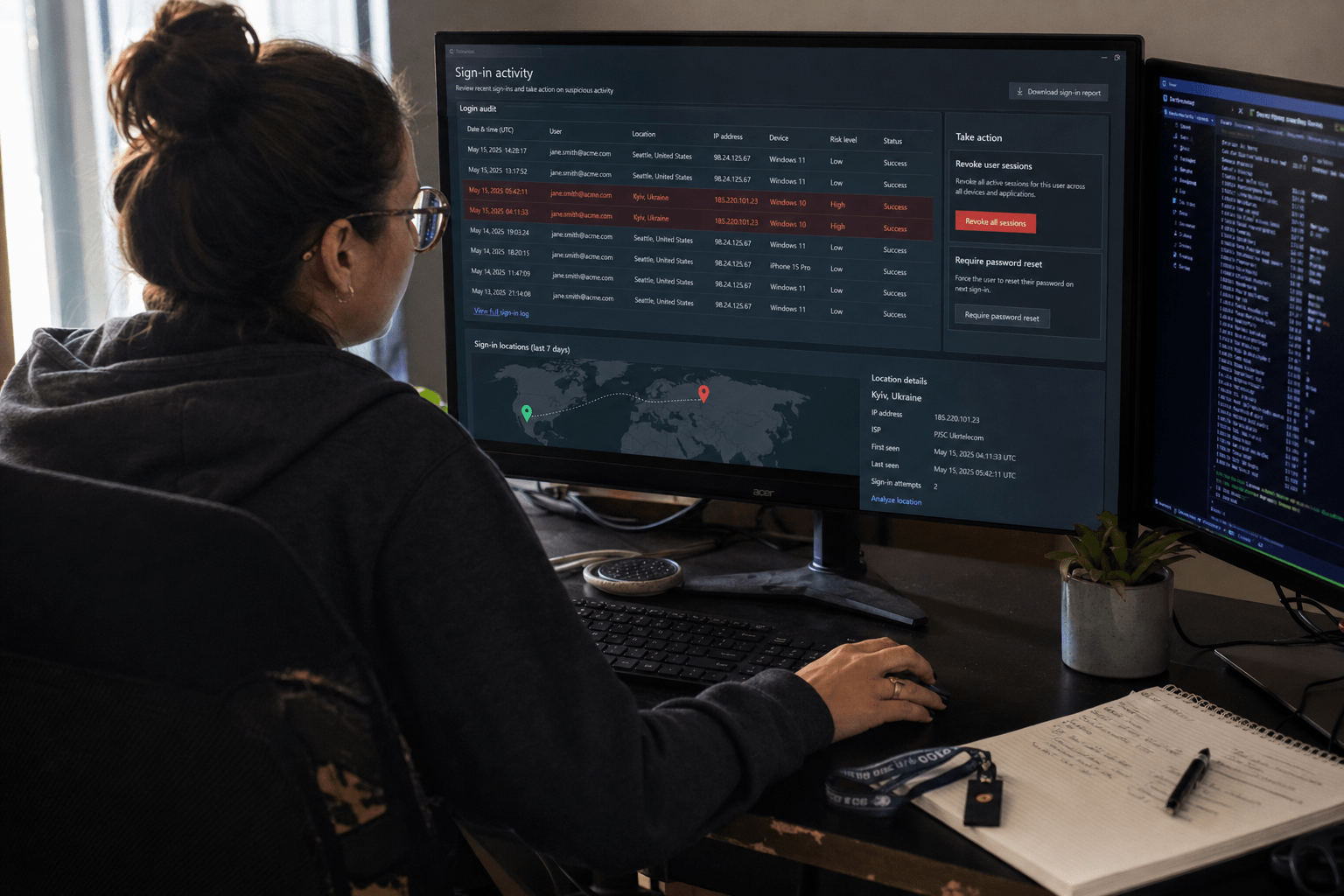
Credential theft in 2026 is mostly a resale business, not a hacking event. A stolen login rarely gets used the hour it is taken. It gets packaged into an infostealer log, sorted, checked for value, sold on to somebody whose actual job is quiet entry, and used weeks later by a person who never touched the original malware. That gap is where small and midsize firms lose. We keep meeting teams who reset one password, close the ticket, and never learn that the same log also carried a live session cookie, a saved browser password for the accounting portal, and an old service account nobody owns. The fix is not a better password rule. It is treating every stolen login as already circulating and building around that.
The Five Things SMBs Get Wrong About Stolen Logins
Before the fixes, here is what our team runs into most often at 20 to 500 employee firms:
- A password reset is treated as containment. It is not. If the attacker holds a valid session cookie, resetting the password changes nothing until the session is revoked.
- MFA is treated as the finish line. Token replay, reverse-proxy phishing kits, and push fatigue all produce logins that satisfy MFA on the way in.
- Personal accounts are treated as out of scope. The reused password on a home shopping site is a live bridge into a work tenant, and it sits outside every policy you control.
- Nobody owns the dormant accounts. Departed staff, old vendor logins, and non-human service accounts are the quietest way in because no human notices the login hour.
- Detection is built around failed logins. Stolen credentials produce successful ones. The signal has to be behavior, not failure count.
Read those as the audience test too. If your firm runs an internal IT lead rather than a security team, a mixed fleet of company and personal devices, and a Microsoft 365 or Google Workspace tenant at the center of everything, this is written for you.
Why Credential Theft Keeps Beating SMB Defenses After the Login Leaks
Credential theft beats SMB defenses because the moment of theft and the moment of use are separated by a supply chain, and almost every small-firm control watches only one of the two. Detection built for the break-in misses the tenant that gets entered politely, with the right password, from a plausible device, four weeks later.
Where Stolen Business Logins Actually Come From
Most stolen business logins reach criminals through infostealer malware rather than a targeted attack on the company. An infostealer is commodity software that runs once on a machine, scrapes saved browser passwords, authentication cookies, autofill data, and crypto wallets, then exits. It arrives in a cracked download, a fake browser update, a malicious ad for common software, or a pirated game a family member installed on a shared laptop. The output is a log file: one victim machine, every credential it held, timestamped.
The uncomfortable part for SMBs is the device. The log that carries your finance manager’s tenant password often comes off a home computer your firm has never inventoried. Company-managed endpoints get patched and monitored. Personal ones do not, which is why device posture and mobile device management matter more to credential exposure than most owners expect. There is no malware on your network to find, because there never was any.
What an Initial-Access Broker Sells, and to Whom
An initial-access broker buys raw logs in bulk, tests the credentials, confirms which ones open a real business tenant, and resells verified access. Public research on the market puts a working set of business credentials in roughly the low hundreds to a few thousand dollars, priced on company revenue and access depth. The buyer is often a ransomware crew that wants entry without doing reconnaissance.
That resale step matters operationally, because it sets your clock. Between theft and use there is usually a verification login: brief, successful, from a residential proxy, doing nothing. It is the most useful early signal a small firm ever gets, and it looks like nothing at all in a login report. Our team treats a clean successful login from an unfamiliar network with no follow-on activity as an incident, not noise.
Why the MFA Prompt Never Fired
Multi-factor authentication stops password-only entry, and it remains one of the highest-return controls an SMB can deploy. It does not stop three things now common at this size of company. Session token theft replays the cookie your browser already holds after a successful challenge, so the attacker inherits an authenticated session and is never asked to prove anything. Reverse-proxy phishing kits such as EvilProxy or Tycoon 2FA sit between the user and the real login page, relay the password and the one-time code live, and capture the resulting cookie. Push fatigue simply spams approval prompts at 2 a.m. until someone taps to make it stop.
None of that is an argument against MFA. It is an argument about which factor you deploy, and the practical steps live in our notes on multi-factor authentication best practices. The counter-view deserves airtime. Plenty of firms with SMS-based MFA go years without incident, and moving a 200-person company to hardware keys costs real money and real goodwill. The honest read is that app-based number matching beats nothing by a wide margin, and phishing-resistant MFA is what you want on accounts that can move money or change identity settings.
The Six Credential Theft Fixes SMBs Should Make in 2026
These six fixes assume a credential is already out, which is the posture that separates them from generic password advice. Run them in order. The first two close the bleeding, the middle two harden entry, and the last two decide whether you find out at all.
Fix 1: Revoke the Session, Not Just the Password
Revoking active sessions is the single step most SMB response plans miss. Password rotation invalidates future authentication attempts. It does not invalidate the token already issued to a browser, which is why an attacker can stay resident through a reset. In Microsoft 365 this means revoking sign-in sessions on the affected user and confirming refresh tokens are dead, not just forcing a password change. Do it for the whole account, including mobile app sessions. Then check for the persistence the attacker left behind while they had the session: a new mailbox forwarding rule, an added authenticator, an OAuth app consent, a changed recovery address. Our cyber incident containment work almost always finds at least one of those four still in place after a firm believed it had recovered.
Fix 2: Break the Personal-to-Work Password Bridge
Password reuse across personal and work accounts is the most common path from a home laptop into a business tenant, and it is the fix with the worst reputation because it sounds like a lecture. Make it mechanical instead. Deploy a company password manager and pay for the family tier so personal credentials land inside it too. Turn on tenant-level checks that block known-breached passwords at the moment a user sets one. Then run the awareness side as a habit rather than an annual slideshow, which is how we structure security awareness training for client teams. One caution worth stating: a password manager concentrates risk, so its own login needs the strongest factor you own.
Fix 3: Put Phishing-Resistant MFA on What Matters Most
Phishing-resistant MFA means factors bound to the legitimate domain, so a relay proxy cannot reuse them: passkeys, FIDO2 hardware keys, or certificate-based authentication. Rolling that across an entire firm at once rarely survives contact with a busy month. Start where the loss would be worst: finance approvers, anyone with administrative rights in the tenant, email accounts that authorize payments, and the remote-access path. Leave app-based number matching on the wider staff, and set conditional access so a sign-in from an unmanaged device or an unusual country has to satisfy the stronger factor. Our multi-factor authentication rollouts for SMBs almost always run in that order, and the second wave lands far more smoothly than the first.
Fix 4: Close the Dormant, Orphaned, and Service Accounts
Dormant and non-human accounts are the quietest credential theft path a small firm has, because there is no user to notice the strange login. Three groups: accounts of departed staff that were disabled in one system and left live in another, vendor or contractor logins created for a project that ended, and service accounts running an integration with a password nobody has rotated since setup. Service accounts are the worst of the three, since they usually hold standing privilege and often sit outside MFA by design. Inventory every account with administrative rights quarterly, name a human owner for each service account, and put the privileged ones behind checkout rather than permanent assignment. We wrote about that model in our piece on privileged access management.
Fix 5: Watch Identity Behavior Instead of Failed Logins
Stolen credential use produces successful logins, so the alerts worth building watch for behavior that a legitimate user would not produce. The four we tune first for client tenants: impossible travel between sign-ins, a sign-in from a hosting or residential-proxy address range, a new mailbox rule or forwarding address, and the creation or alteration of an authentication method. Add the verification-login pattern from earlier, a successful sign-in with no meaningful activity attached. Those signals need somewhere to land, which is the practical case for network security monitoring with a human reading the output rather than a dashboard nobody opens. The honest limit is noise: a firm with heavy travel and a VPN will generate false positives for weeks before the tuning settles.
Fix 6: Write the Rotation Playbook Before You Need It
Credential rotation goes badly when it is invented under pressure at 9 p.m. Write it once as a short sequence: revoke sessions, reset the password, re-enroll the authenticator from a known-good device, audit mailbox rules and OAuth grants, then rotate every credential that account could reach, including anything stored in its browser profile or password manager. Add a scope rule for shared and service credentials, since one compromised admin often means rotating a dozen integration secrets. Pair it with exposure monitoring so you learn about a leak from a feed instead of a customer, which is what dark web monitoring is genuinely good for. Rehearse it on one non-critical account per quarter. The rehearsal is what makes the real one calm.
What Detection Looks Like When You Assume a Login Is Already Out
Assume-breach detection for identity means you stop asking whether a credential leaked and start asking which one, and when it will be used. That changes three habits. Exposure feeds get reviewed on a schedule and matched against your real user list, not skimmed when something scary makes the news. Sign-in logs get a weekly human pass for the quiet patterns, since the verification login is built to look boring. And every phishing wave gets treated as a credential event, because AI-written lures removed the spelling errors that used to carry your staff’s judgment, a shift we cover in our look at AI-generated phishing threats and our notes on AI and identity theft. Where a firm has no capacity for that weekly pass, buying it is reasonable. Where an internal IT lead already exists, teaching the pattern is the better spend, and it survives staff turnover better than a tool subscription.
Frequently Asked Questions
How do I know if a credential theft has already happened?
You look for successful sign-ins that a legitimate user would not produce, since stolen credentials do not generate failed attempts. The strongest early indicators are impossible travel, a sign-in from a proxy or hosting address, a brief successful login with no follow-on activity, and any change to mailbox rules or registered authentication methods.
Does MFA stop credential theft?
MFA stops password-only entry, which is a large share of attempts, but it does not stop session token replay, reverse-proxy phishing, or push fatigue approval. Phishing-resistant factors such as passkeys or FIDO2 keys close the relay path, and revoking sessions closes the token path.
Is changing the password enough after a stolen login?
No. A password change does not invalidate an active session token, so an attacker holding a stolen cookie can stay signed in through the reset. Revoke sessions and refresh tokens first, then reset the password and audit for forwarding rules, OAuth grants, and added authenticators.
How often should SMBs rotate service account credentials?
Rotate service account secrets at least annually, and immediately after any incident involving an account that could read them. The bigger win is naming a human owner for every service account, because unowned integration credentials are the ones that go five years without a rotation.
What does an initial-access broker do with stolen credentials?
An initial-access broker verifies which stolen credentials open a live business environment and resells that confirmed access to another criminal group, often a ransomware operator. That resale step is why weeks can pass between the theft of a credential and any visible activity in your tenant.
Talk to Mindcore About Your Credential Exposure
Credential theft is not a password problem anymore, and the firms that handle it well assume a login is already circulating and design for the hour after. Our team works the same order every time: revoke sessions properly, break the personal-to-work reuse bridge, put phishing-resistant factors on the accounts that can move money, close the accounts nobody owns, watch identity behavior rather than failure counts, and rehearse rotation before it is urgent. If your firm reset a password recently and is not certain the session went with it, that is worth an hour this week. Book a free strategy call and we will walk your sign-in patterns, privileged accounts, and exposure feeds with you, then tell you plainly which of the six fixes you need first. If something is already moving, our data breach incident response team can start today.

