

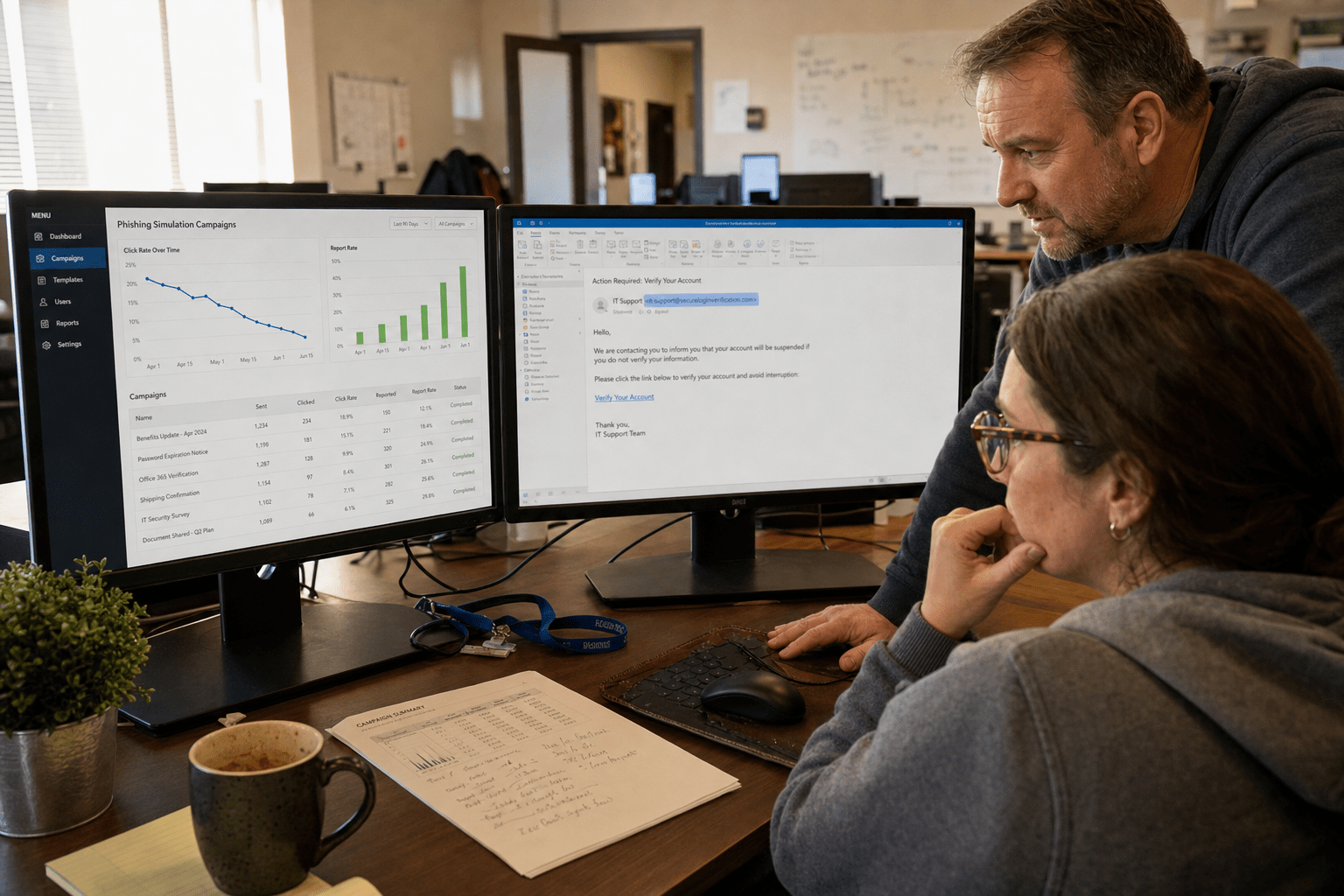
A phishing simulation is a controlled, permission-based test that sends staff a fake but realistic lure so the security team can measure how people actually behave before a real attacker gets the chance. Run well, it produces two numbers worth acting on: how many people report the message, and how fast the first report lands. Run badly, it produces a falling click rate that flatters everyone and protects nobody. Our team has audited dozens of these programs at 50 to 500 employee firms, and the failures repeat. The same five mistakes show up whether the company bought a platform, built the sends in-house, or inherited the program from a departed IT manager.
Five Principles Behind a Phishing Simulation Program That Works
Before the mistakes, the ground rules we hold every program to:
- Report rate is the health metric, not click rate. A click is one person having a bad Tuesday. A report is your detection pipeline working.
- Time-to-report is the number that decides containment. Credential-harvesting kits monetize stolen logins in minutes, so a report at four hours is nearly worthless.
- Difficulty has to escalate. A test the workforce can pass on autopilot has stopped measuring anything.
- The channel mix has to match the threat mix. Attackers moved into Teams chat, SMS, and voice callback. Email-only testing leaves those doors untested.
- Simulation data belongs in the same queue as real alerts. If simulated reports and live reports go to different places, the habit you trained does not transfer.
Everything below is a failure to hold one of those five lines. If you want the attacker-side context first, our reference page on how phishing attacks are built and delivered covers the tradecraft this article assumes.
Where This Phishing Simulations Guide Starts: The Baseline You Skipped
A phishing simulation program without a documented baseline cannot prove improvement, because there is no honest number to improve from. This is the quietest failure we find, and it usually happens for a sympathetic reason. Someone launched the first campaign, the click rate came back embarrassing, and nobody wrote it down. Six months later the program reports a 4% click rate with no idea whether that is progress or noise.
Take the baseline on the hardest realistic template you are willing to send, not the easiest. Record four values: click rate, credential-submission rate, report rate, and median minutes to first report. Segment by department and by tenure, because the aggregate hides the risk. Finance and executive assistants carry more exposure per click than anyone else in the building, and a company-wide average will bury a 30% finance click rate under a healthy-looking 7%.
One more thing our team insists on: get the baseline in writing to leadership before you improve anything. A program that reports only after the numbers look good loses the standing it needs when it has to ask for budget.
Mistake 1: Scoring the Program on Click Rate Alone
Click rate measures who failed one test, while report rate measures whether your workforce has become part of your detection capability. Both matter, but only one of them keeps getting better for the wrong reasons.
Here is what we see in the wild. A company runs the same platform for eighteen months. Click rate drops from 22% to 5%, the annual report goes out, everyone is pleased. Then we run a fresh template the platform has never sent, written to look like their actual payroll provider, and the click rate lands at 19%. The workforce had not learned to read a suspicious message. It had learned to recognize that vendor’s writing style, its link-shortener domain, and its tell-tale header. That is pattern-matching against the test, not against the threat.
Report rate resists that failure mode, because reporting is a behavior rather than an avoidance. Track it as the headline number and hold two targets: report rate above 40% within a year of steady testing, and median time to first report under fifteen minutes. If you only ever move one metric, move time-to-report. Containment math is unforgiving, and the article on how a single phishing click turns into a data breach walks the timeline from click to lateral movement.
Mistake 2: Sending the Same Easy Template Every Quarter
A simulated phishing test stops producing usable data the moment the workforce can pass it without reading it. Difficulty has to climb, and most programs never build the ladder.
Start easy and escalate on a schedule. Tier one is the generic bulk lure with an obvious mismatch between display name and sending domain. Tier two is a branded impersonation of a service the company genuinely uses, cloned closely enough that the only tell is the domain. Tier three is targeted: the sender name is a real internal manager, the request references a real project, and the pretext arrives at a plausible moment in the month. That third tier is where real losses happen, and it is the tier almost nobody tests. Our page on spear phishing and targeted impersonation covers why the personalized variant defeats generic training.
Two guardrails when you escalate. Never impersonate a real named employee without that person’s consent, because the internal damage outlasts the lesson. And never use a lure that promises a bonus, a raise, or news about layoffs. We have watched a single fake-bonus simulation cost a company more trust than a year of training bought, and the program got shut down by HR the following week.
Generative tooling has also collapsed the cost of tier-three quality for attackers. Fluent, on-brand, error-free lures are now the baseline rather than the exception, which our piece on AI-generated phishing threats facing SMBs breaks down in detail. If your hardest template is still riddled with the grammar mistakes that used to give phishing away, you are testing against a threat that retired.
Mistake 3: Punishing the Click Instead of Rewarding the Report
Punitive phishing programs reliably lower click rate and lower report rate at the same time, which is the worst pair of outcomes available. We consider this the most damaging mistake on the list because it is self-concealing: the dashboard improves while the actual capability degrades.
The mechanism is simple. When a click triggers a manager notification, a scorecard entry, or a public shaming in the all-hands deck, employees learn that contact with security is expensive. So they stop making contact. The person who clicked at 9:02 and realized it at 9:03 now says nothing, and your fifteen-minute containment window closes unused. Worse, colleagues who saw the same message decide it is not their problem to raise.
Flip the incentive. Make reporting the only tracked individual behavior, celebrate the first reporter of each campaign by name, and route clicks to a two-minute coaching moment with no manager copied. Repeat clickers get more practice and closer coaching, not a disciplinary record. That approach is baked into how we structure security awareness training for our clients, and the report-rate curve it produces is the one that survives a real incident.
Mistake 4: Running Email Only While Attacks Moved to Chat and Voice
Email-only phishing simulations test a shrinking share of the attack surface, because the fastest-growing lures now arrive in collaboration chat, SMS, and callback voice. If your program has never sent a simulated Teams message, the workforce has zero rehearsed response for the channel where they trust messages most.
The trust asymmetry is the whole problem. Staff have been trained for a decade to treat email with suspicion, and trained by nothing at all to distrust a chat message from an external account with a familiar display name. Guest-access and federated-chat abuse exploits exactly that gap, and the patterns are catalogued in our write-up on Microsoft Teams phishing attacks hitting SMBs.
Add channels deliberately rather than all at once. Quarter one, add a chat-based lure. Quarter two, add an SMS test for staff whose numbers are published on the website. Quarter three, add a callback pretext, where the message contains no link at all and asks the recipient to phone a number. That last one defeats every link-scanning control you own, which is precisely why attackers favor it. For teams that need help reading the signals across channels, the walkthrough on spotting a phishing message before it is too late is the piece we hand to new hires.
Mistake 5: Leaving the Simulation Disconnected From Detection
A phishing simulation program earns its cost only when reports land in the same queue that handles real incidents, on the same button, with the same response. Most programs we audit fail here, and the failure is architectural rather than behavioral.
The pattern is a dedicated vendor report button that fires simulation telemetry to a training portal, sitting next to a separate mailbox for real suspicious mail that nobody remembers. Staff practice one motion and are expected to perform another. Unify it: one button, one destination, and a triage workflow that treats a simulated report and a live report identically until triage says otherwise.
Then close the loop the other direction. Every real reported message that turns out to be malicious becomes next quarter’s template, with identifying details scrubbed. That is how a simulation program stops guessing what the workforce faces and starts rehearsing it. Clients on our managed security services get this wiring by default, because a report that reaches nobody is telemetry thrown away.
Frequently Asked Questions
How often should a small business run phishing simulations?
Most SMBs get the best results from monthly simulations delivered to rotating segments of the workforce, so every employee sees roughly four to six tests a year without campaign fatigue. Quarterly testing is the practical floor, and anything less frequent measures memory rather than habit. Programs at higher maturity move to a two to four week cadence with continuous random delivery.
What is a good phishing simulation click rate?
Under 5% on a tier-one template is common and means less than most teams assume, because easy templates stop discriminating quickly. A more useful target is holding click rate under 10% on a hard, branded, internally-plausible lure while report rate sits above 40%. Judge the pair together, never the click rate alone.
Should employees be told that phishing simulations are running?
Tell the workforce that simulations are part of the program, and never announce individual campaigns. Blanket disclosure at program launch keeps the exercise ethical and keeps HR aligned, while per-campaign warnings destroy the measurement entirely. Publishing the reporting process at the same time is what converts disclosure into a higher report rate.
Do phishing simulations satisfy compliance training requirements?
Simulated testing supports the workforce-training expectations in frameworks such as HIPAA, PCI DSS, and the CMMC awareness practices, but it rarely satisfies them on its own. Auditors look for documented curriculum, completion records, and evidence of remediation for repeat failures alongside the simulation data. Keep the campaign exports and the coaching records together so the evidence trail holds up.
What should happen when an employee clicks a simulated phish?
Route them straight to a short coaching page that names the tells they missed in that exact message, and log the event without notifying their manager. Immediate, private, message-level feedback outperforms an annual course by a wide margin. Reserve escalation for people who submit credentials repeatedly across multiple campaigns, and treat that as a coaching problem rather than a conduct one.
Build a Program That Measures Behavior, Not Template Recognition
The through-line in all five mistakes is the same: a phishing simulation program drifts toward measuring itself instead of measuring risk. Click rate falls because the tests got familiar. Reporting stalls because contact with security got expensive. The channels attackers actually use go untested because the platform defaults to email. Every one of those problems is fixable inside a quarter, and none of them requires a bigger tool. It requires a written baseline, an escalating template ladder, an incentive pointed at reporting, a channel mix that matches reality, and one report button that reaches the people who respond to real incidents.
If you want a second set of eyes on the program you already run, our team will review your last four campaigns, rebuild the metric set around report rate and time-to-report, and hand you a template ladder scoped to your industry and headcount. Book a free strategy call with Mindcore and we will start with the baseline you have, however uncomfortable the first number looks.

